> ## Documentation Index
> Fetch the complete documentation index at: https://docs.dynamic.xyz/docs/llms.txt
> Use this file to discover all available pages before exploring further.
# Authenticate with SMS
## Dashboard Configuration
Toggle on "Phone Number" in [the Log in & User Profile section of the dashboard](https://app.dynamic.xyz/dashboard/log-in-user-profile).
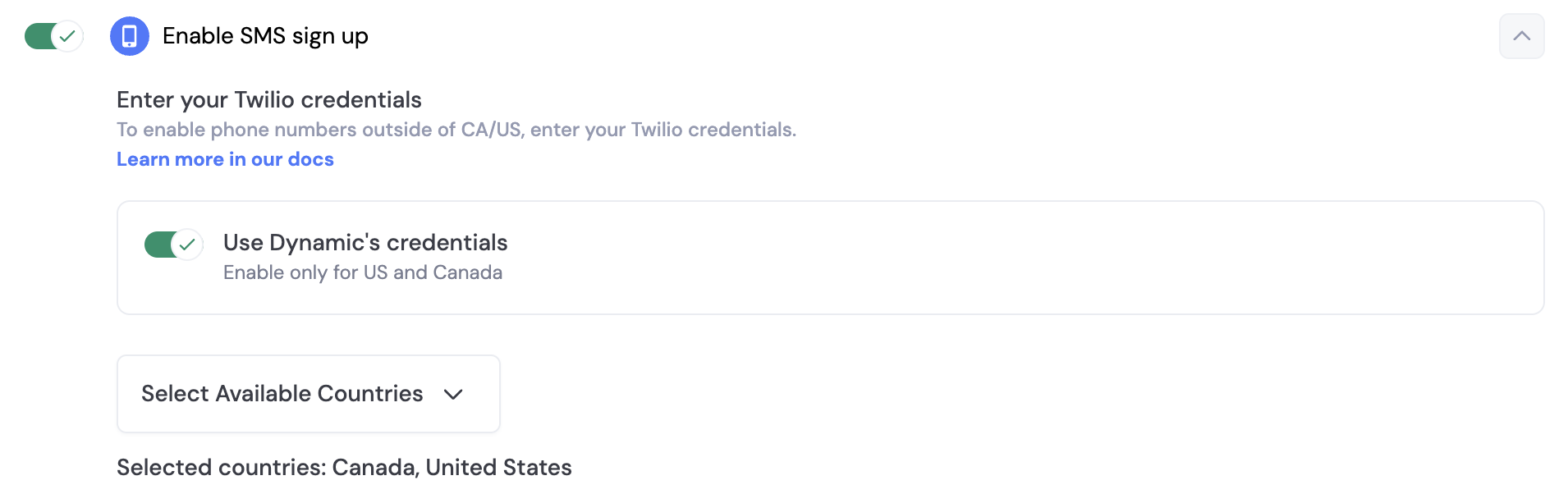
By default, you can use Dynamics credentials to send SMS messages to your users. However, if you want to send beyond US & Canada, you will need to set up your own Twilio account. In order to do this, you toggle off "Use Dynamic's credentials" and a section will open up for you, where you can enter your own credentials.
## SMS & Embedded Wallets
When you enable SMS sign-up, you can also enable embedded wallets for your users. This means that when a user signs up with their phone number, they will also receive a wallet that they can use to interact with your application.
In order to ensure your end users are adequately protected against attacks like sim swaps, we highly encourage you to [enable account MFA (TOTP) via Google Authenticator](/react/authentication-methods/mfa).
## Prerequisites
Before this: create and initialize a Dynamic client (see [Creating a Dynamic Client](/javascript/reference/client/create-dynamic-client), [Initializing the Dynamic Client](/javascript/reference/client/initialize-dynamic-client)).
## Usage
```javascript theme={"system"}
import {
sendSmsOTP,
verifyOTP
} from '@dynamic-labs-sdk/client';
// With the user's phone number, call sendSmsOTP to get the otpVerification
// Then, once the user inputs the OTP code, call verifyOTP to verify it and complete the authentication
let otpVerification = null;
const signInWithPhone = async () => {
// Replace 'US' with the user's country code and '1234567890' with the user's phone number
otpVerification = await sendSmsOTP({ isoCountryCode: 'US', phoneNumber: '1234567890' });
// Store the otpVerification for later use with the verifyOTP function
};
const handleVerifyOTP = async () => {
// Use the same otpVerification object that you got from the sendSmsOTP function
// Replace '123456' with the OTP code entered by the user
await verifyOTP({ otpVerification, verificationToken: '123456' });
};
```
```tsx theme={"system"}
import { useSendSmsOTP, useVerifyOTP } from '@dynamic-labs-sdk/react-hooks';
import { useState } from 'react';
function SmsSignIn() {
const [phoneNumber, setPhoneNumber] = useState('');
const [isoCountryCode, setIsoCountryCode] = useState('US');
const [otp, setOtp] = useState('');
const { mutate: sendSmsOTP, data: otpVerification, reset } = useSendSmsOTP();
const { mutate: verifyOTP, isPending: isVerifying } = useVerifyOTP();
if (otpVerification) {
return (
 By default, you can use Dynamics credentials to send SMS messages to your users. However, if you want to send beyond US & Canada, you will need to set up your own Twilio account. In order to do this, you toggle off "Use Dynamic's credentials" and a section will open up for you, where you can enter your own credentials.
## SMS & Embedded Wallets
When you enable SMS sign-up, you can also enable embedded wallets for your users. This means that when a user signs up with their phone number, they will also receive a wallet that they can use to interact with your application.
In order to ensure your end users are adequately protected against attacks like sim swaps, we highly encourage you to [enable account MFA (TOTP) via Google Authenticator](/react/authentication-methods/mfa).
## Prerequisites
Before this: create and initialize a Dynamic client (see [Creating a Dynamic Client](/javascript/reference/client/create-dynamic-client), [Initializing the Dynamic Client](/javascript/reference/client/initialize-dynamic-client)).
## Usage
By default, you can use Dynamics credentials to send SMS messages to your users. However, if you want to send beyond US & Canada, you will need to set up your own Twilio account. In order to do this, you toggle off "Use Dynamic's credentials" and a section will open up for you, where you can enter your own credentials.
## SMS & Embedded Wallets
When you enable SMS sign-up, you can also enable embedded wallets for your users. This means that when a user signs up with their phone number, they will also receive a wallet that they can use to interact with your application.
In order to ensure your end users are adequately protected against attacks like sim swaps, we highly encourage you to [enable account MFA (TOTP) via Google Authenticator](/react/authentication-methods/mfa).
## Prerequisites
Before this: create and initialize a Dynamic client (see [Creating a Dynamic Client](/javascript/reference/client/create-dynamic-client), [Initializing the Dynamic Client](/javascript/reference/client/initialize-dynamic-client)).
## Usage