> ## Documentation Index
> Fetch the complete documentation index at: https://docs.dynamic.xyz/docs/llms.txt
> Use this file to discover all available pages before exploring further.
# Setting up Webhooks
## Setting up Webhooks
Identify what events you would like to monitor [here](/overview/developer-dashboard/webhooks/events).
Develop a webhook endpoint to receive event data POST requests, making sure it uses HTTPS.
Register your endpoint with Dynamic using the [Webhooks Developer Dashboard](https://app.dynamic.xyz/dashboard/developer/webhooks) or the API.
## Signature validation
Dynamic follows general best practice when it comes to signature validation. As such, each payload includes a `x-dynamic-signature-256` header which has a hash signature value, generated from your secret token.
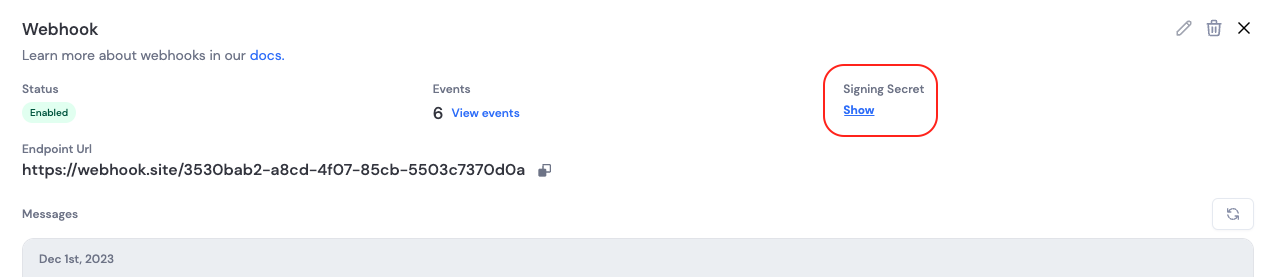
Each webhook has a unique secret token that is used to generate the message signature from the event object. This secret can be found on the webhook detail page in the Developer Dashboard.
 Verify that each request originated from Dynamic and the payload has not been tampered with by comparing the `x-dynamic-signature-256` header to an HMAC-SHA256 of the raw request body using your webhook secret. Use a constant-time comparison to avoid timing attacks.
```typescript theme={"system"}
import * as crypto from "crypto";
export const verifySignature = ({
secret,
signature,
payload,
}: {
secret: string;
signature: string;
payload: any;
}) => {
const payloadSignature = crypto
.createHmac("sha256", secret)
.update(JSON.stringify(payload))
.digest("hex");
const trusted = Buffer.from(`sha256=${payloadSignature}`, "ascii");
const untrusted = Buffer.from(signature, "ascii");
return crypto.timingSafeEqual(trusted, untrusted);
};
```
The structure of the payload object must match exactly how the message was sent; otherwise signature verification will fail.
Example: pass your webhook secret, the value of the `x-dynamic-signature-256` header, and the parsed JSON body to `verifySignature`. Only process the event if it returns `true`. For other languages, the same approach applies (HMAC-SHA256, constant-time compare); see [GitHub's webhook validation guide](https://docs.github.com/en/webhooks/using-webhooks/validating-webhook-deliveries) for a similar format.
## Next Steps
* Learn about [Event Delivery & Best Practices](/overview/developer-dashboard/webhooks/delivery-best-practices) for production implementation
* Review the [Event Types](/overview/developer-dashboard/webhooks/events) to understand what events you can monitor
Verify that each request originated from Dynamic and the payload has not been tampered with by comparing the `x-dynamic-signature-256` header to an HMAC-SHA256 of the raw request body using your webhook secret. Use a constant-time comparison to avoid timing attacks.
```typescript theme={"system"}
import * as crypto from "crypto";
export const verifySignature = ({
secret,
signature,
payload,
}: {
secret: string;
signature: string;
payload: any;
}) => {
const payloadSignature = crypto
.createHmac("sha256", secret)
.update(JSON.stringify(payload))
.digest("hex");
const trusted = Buffer.from(`sha256=${payloadSignature}`, "ascii");
const untrusted = Buffer.from(signature, "ascii");
return crypto.timingSafeEqual(trusted, untrusted);
};
```
The structure of the payload object must match exactly how the message was sent; otherwise signature verification will fail.
Example: pass your webhook secret, the value of the `x-dynamic-signature-256` header, and the parsed JSON body to `verifySignature`. Only process the event if it returns `true`. For other languages, the same approach applies (HMAC-SHA256, constant-time compare); see [GitHub's webhook validation guide](https://docs.github.com/en/webhooks/using-webhooks/validating-webhook-deliveries) for a similar format.
## Next Steps
* Learn about [Event Delivery & Best Practices](/overview/developer-dashboard/webhooks/delivery-best-practices) for production implementation
* Review the [Event Types](/overview/developer-dashboard/webhooks/events) to understand what events you can monitor