> ## Documentation Index
> Fetch the complete documentation index at: https://docs.dynamic.xyz/docs/llms.txt
> Use this file to discover all available pages before exploring further.
# Migrating to Dynamic
Migration from one auth and embedded wallet provider to another can seem daunting. You have users, they might have wallets, and a subset of them will have assets in their wallets, making it a fun adventure of a migration. But have no fear! We can help. Below, we put together a guide on migration strategies you can think through depending on your use case. At the end of the guide you'll also find some helpful tips and techniques to ensure the migration all goes smoothly.
When in doubt, talk to us. Migrations can get complex, and we'd love to help
guide you through them. You can [set up a call with us
here](https://www.dynamic.xyz/talk-to-us)
If you don't want to migrate yet, but want to take advantage of Dynamic on top of your existing provider, you can also use [our Third Party Authentication feature](/overview/authentication/bring-your-own-auth).
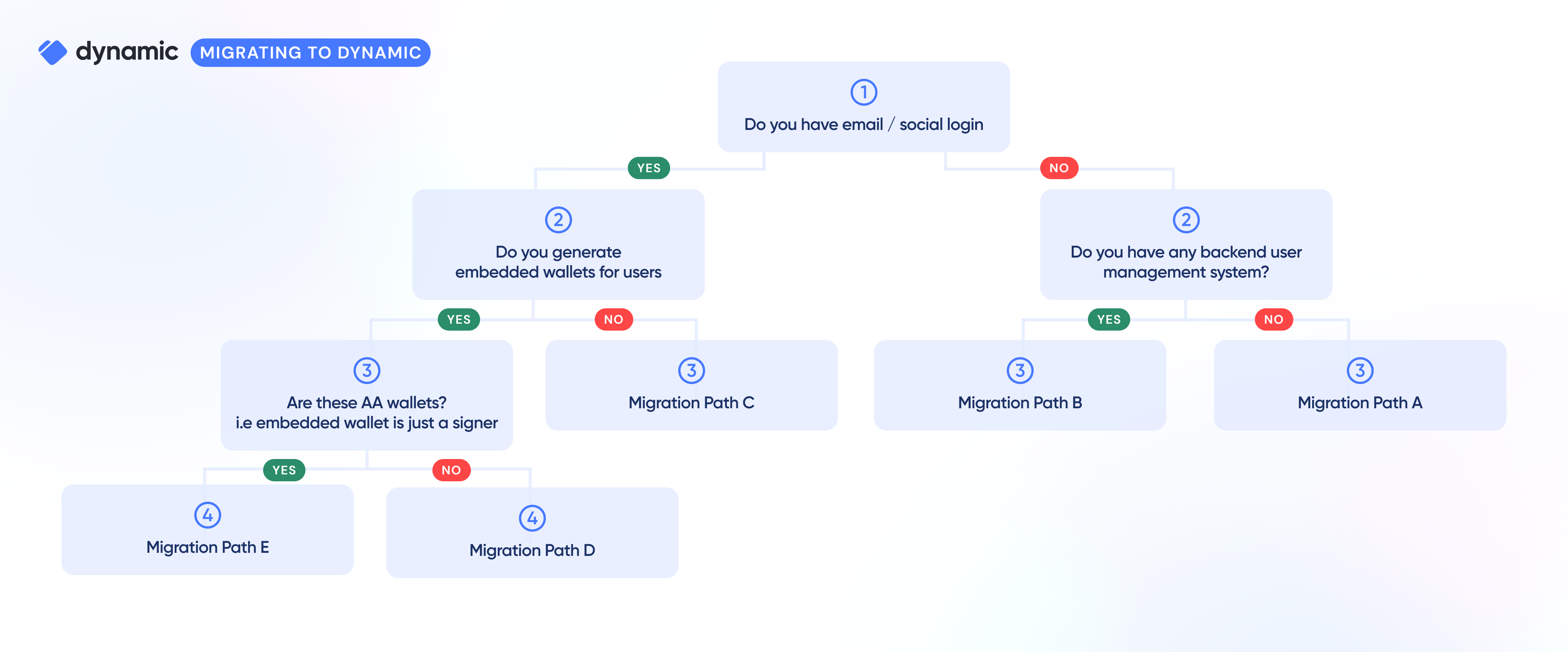
We put together a simple flow chart to help you identify the right migration strategy:
 ## Migration Path A: You only have a front-end "connect wallet" flow
### Common scenarios
You built your own front end wallet connector or use Rainbowkit/ConnectKit. There is no SIWE, no issuing JWTs, and mostly just a front end.
### Recommended approach
You pretty much just swap out the modals. If you use wagmi, add our [wagmi connector](/react/reference/using-wagmi#-install-wagmi) and follow our [rainbowkit guide](/overview/migrations/tutorials/rainbowkit), but in general, no migration needed. After the initial update to the Dynamic modal, you can stay on our [connect-only mode](/react/wallets/external-wallets/connected-vs-authenticated) and not store any user info with Dynamic, or alternatively start adding more sophisticated features.
## Migration Path B: You store wallet info somewhere and a wallet is a user
### Common scenarios
You built your own front end wallet connector or use Rainbowkit/ConnectKit, and in addition implemented a SIWE on your own, authenticating users and creating sessions for them.
### Recommended approach
For front end changes, you can follow path A above. In addition, you can use our [create wallet](https://dynamic.xyz/docs/api-reference/wallets/createWallet) endpoint to generate users and add wallet records to them. When they first log in, they will verify wallet ownership via SIWE (we provide that and return a JWT - you don't need to do this), and you're done.
## Migration Path C: You have users, but no embedded wallets
### Common scenarios
You use Auth0, Firebase or another web2 user management system, or alternatively created something on your own. You store your users' emails and basic info.
### Recommended approach
You'll need to import your users into Dynamic
1. [Bulk upsert your users into Dynamic](https://dynamic.xyz/docs/api-reference/users/bulkCreateUser), including their info capture/kyc information and their data
2. For any profile information that Dynamic does not yet explicitly support, you can add these in the user.metadata, which is a key-value object
3. When they log in, we verify their emails
And that's it. You're done. When your users log in next time around, we will verify their email addresses/social login information independently as part of the auth flow, and issue a JWT once you have successfully logged in.
## Migration Path D: You have users, and they have embedded EOA wallets
### Common scenarios
You use an embedded wallets provider, or have built a simple KMS-based key management system on your own
### Recommended approach
**There are really two options here:**
1. Keep current users in their existing embedded wallets and generate Dynamic wallets for new users
2. Migrate existing wallet users to Dynamic
**Keep current users:**
1. Switch to Dynamic auth
2. When user logs in with email, check if they have an existing account:
* If so, redirect them to old login flow
* If they don't, create a Dynamic-powered embedded wallet for them
```typescript theme={"system"}
import { useDynamicWaas } from "@dynamic-labs/sdk-react-core";
// component declaration and all other logic you might need
const { createWalletAccount } = useDynamicWaas();
const onCreateWalletHandler = async () => {
try {
await createWalletAccount();
} catch (e) {
console.error(e);
}
};
```
## Migration Path E: You have users, and they have AA wallets
### Considerations
1. Your users have an EOA embedded wallet, but it only serves as a signer for an AA layer (safe, zerodev etc).
2. Hence, you'll want to add the Dynamic-powered embedded wallet as a second signer to the AA layer, or alternatively swap signers from the old embedded wallet one to the Dynamic one
**Main activities**
You'll want to have the end user add their new Dynamic wallet as a second signer to the smart contract wallet, or alternatively have them replace the current signer with a second signer
**Steps**
This is non-trivial, and we recommend that we chat before starting this
process. [You can book time here](https://www.dynamic.xyz/talk-to-us)
## Extra Migration Techniques/Tips
### Asset Transfers
If your users have assets in their existing embedded wallets, then you'll want to ensure they move those over to their new Dynamic-powered embedded wallets. To do this, you'll want to build a migration flow for your users either using your own UI to prompt asset transfer (recommended), or by sending them to a tool such as [BulkSender](https://bulksender.app/).
### Webhooks
As you import your users into Dynamic, you may want to notify other systems and take further action - webhooks allow you to do exactly this. We have events such as user.created, user.updated, wallet.created and many more (find the full list [here](/overview/developer-dashboard/webhooks/events)).
Setting them up is as simple as providing a URL to post to [in the Dynamic Dashboard](https://app.dynamic.xyz/dashboard/developer/webhooks) and selecting which events you'd like to subscribe to (there's a full guide [here](/overview/developer-dashboard/webhooks)).
## Migration Path A: You only have a front-end "connect wallet" flow
### Common scenarios
You built your own front end wallet connector or use Rainbowkit/ConnectKit. There is no SIWE, no issuing JWTs, and mostly just a front end.
### Recommended approach
You pretty much just swap out the modals. If you use wagmi, add our [wagmi connector](/react/reference/using-wagmi#-install-wagmi) and follow our [rainbowkit guide](/overview/migrations/tutorials/rainbowkit), but in general, no migration needed. After the initial update to the Dynamic modal, you can stay on our [connect-only mode](/react/wallets/external-wallets/connected-vs-authenticated) and not store any user info with Dynamic, or alternatively start adding more sophisticated features.
## Migration Path B: You store wallet info somewhere and a wallet is a user
### Common scenarios
You built your own front end wallet connector or use Rainbowkit/ConnectKit, and in addition implemented a SIWE on your own, authenticating users and creating sessions for them.
### Recommended approach
For front end changes, you can follow path A above. In addition, you can use our [create wallet](https://dynamic.xyz/docs/api-reference/wallets/createWallet) endpoint to generate users and add wallet records to them. When they first log in, they will verify wallet ownership via SIWE (we provide that and return a JWT - you don't need to do this), and you're done.
## Migration Path C: You have users, but no embedded wallets
### Common scenarios
You use Auth0, Firebase or another web2 user management system, or alternatively created something on your own. You store your users' emails and basic info.
### Recommended approach
You'll need to import your users into Dynamic
1. [Bulk upsert your users into Dynamic](https://dynamic.xyz/docs/api-reference/users/bulkCreateUser), including their info capture/kyc information and their data
2. For any profile information that Dynamic does not yet explicitly support, you can add these in the user.metadata, which is a key-value object
3. When they log in, we verify their emails
And that's it. You're done. When your users log in next time around, we will verify their email addresses/social login information independently as part of the auth flow, and issue a JWT once you have successfully logged in.
## Migration Path D: You have users, and they have embedded EOA wallets
### Common scenarios
You use an embedded wallets provider, or have built a simple KMS-based key management system on your own
### Recommended approach
**There are really two options here:**
1. Keep current users in their existing embedded wallets and generate Dynamic wallets for new users
2. Migrate existing wallet users to Dynamic
**Keep current users:**
1. Switch to Dynamic auth
2. When user logs in with email, check if they have an existing account:
* If so, redirect them to old login flow
* If they don't, create a Dynamic-powered embedded wallet for them
```typescript theme={"system"}
import { useDynamicWaas } from "@dynamic-labs/sdk-react-core";
// component declaration and all other logic you might need
const { createWalletAccount } = useDynamicWaas();
const onCreateWalletHandler = async () => {
try {
await createWalletAccount();
} catch (e) {
console.error(e);
}
};
```
## Migration Path E: You have users, and they have AA wallets
### Considerations
1. Your users have an EOA embedded wallet, but it only serves as a signer for an AA layer (safe, zerodev etc).
2. Hence, you'll want to add the Dynamic-powered embedded wallet as a second signer to the AA layer, or alternatively swap signers from the old embedded wallet one to the Dynamic one
**Main activities**
You'll want to have the end user add their new Dynamic wallet as a second signer to the smart contract wallet, or alternatively have them replace the current signer with a second signer
**Steps**
This is non-trivial, and we recommend that we chat before starting this
process. [You can book time here](https://www.dynamic.xyz/talk-to-us)
## Extra Migration Techniques/Tips
### Asset Transfers
If your users have assets in their existing embedded wallets, then you'll want to ensure they move those over to their new Dynamic-powered embedded wallets. To do this, you'll want to build a migration flow for your users either using your own UI to prompt asset transfer (recommended), or by sending them to a tool such as [BulkSender](https://bulksender.app/).
### Webhooks
As you import your users into Dynamic, you may want to notify other systems and take further action - webhooks allow you to do exactly this. We have events such as user.created, user.updated, wallet.created and many more (find the full list [here](/overview/developer-dashboard/webhooks/events)).
Setting them up is as simple as providing a URL to post to [in the Dynamic Dashboard](https://app.dynamic.xyz/dashboard/developer/webhooks) and selecting which events you'd like to subscribe to (there's a full guide [here](/overview/developer-dashboard/webhooks)).