> ## Documentation Index
> Fetch the complete documentation index at: https://docs.dynamic.xyz/docs/llms.txt
> Use this file to discover all available pages before exploring further.
# Authenticate with SMS
## Dashboard Configuration
Toggle on "Phone Number" in [the Log in & User Profile section of the dashboard](https://app.dynamic.xyz/dashboard/log-in-user-profile).
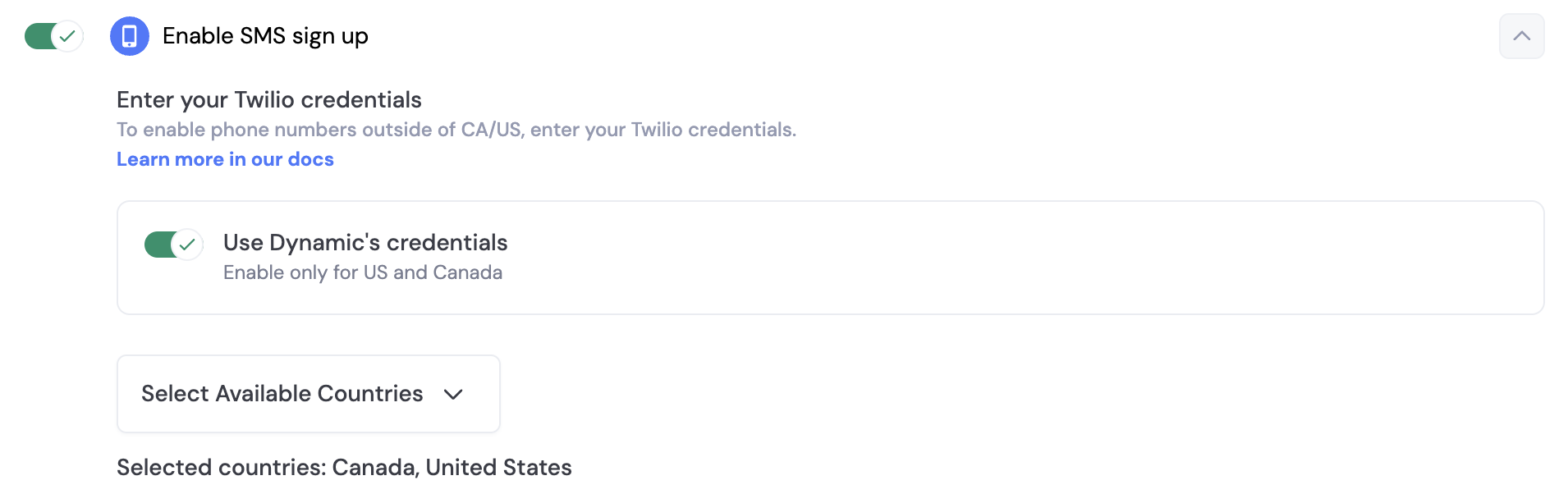 By default, you can use Dynamics credentials to send SMS messages to your users. However, if you want to send beyond US & Canada, you will need to set up your own Twilio account. In order to do this, you toggle off "Use Dynamic's credentials" and a section will open up for you, where you can enter your own credentials.
## SMS & Embedded Wallets
When you enable SMS sign-up, you can also enable embedded wallets for your users. This means that when a user signs up with their phone number, they will also receive a wallet that they can use to interact with your application.
In order to ensure your end users are adequately protected against attacks like sim swaps, we highly encourage you to [enable account MFA (TOTP) via Google Authenticator](/react/authentication-methods/mfa).
React Native provides SMS authentication through the dynamic client's auth methods. You can send OTP codes and verify them programmatically.
```tsx React Native theme={"system"}
import { dynamicClient } from '';
await dynamicClient.auth.sms.sendOTP({
dialCode: '1',
iso2: 'us',
phone: '2793334444',
});
// Later, verify:
await dynamicClient.auth.sms.verifyOTP('received-token');
// Resend if needed:
await dynamicClient.auth.sms.resendOTP();
```
By default, you can use Dynamics credentials to send SMS messages to your users. However, if you want to send beyond US & Canada, you will need to set up your own Twilio account. In order to do this, you toggle off "Use Dynamic's credentials" and a section will open up for you, where you can enter your own credentials.
## SMS & Embedded Wallets
When you enable SMS sign-up, you can also enable embedded wallets for your users. This means that when a user signs up with their phone number, they will also receive a wallet that they can use to interact with your application.
In order to ensure your end users are adequately protected against attacks like sim swaps, we highly encourage you to [enable account MFA (TOTP) via Google Authenticator](/react/authentication-methods/mfa).
React Native provides SMS authentication through the dynamic client's auth methods. You can send OTP codes and verify them programmatically.
```tsx React Native theme={"system"}
import { dynamicClient } from '';
await dynamicClient.auth.sms.sendOTP({
dialCode: '1',
iso2: 'us',
phone: '2793334444',
});
// Later, verify:
await dynamicClient.auth.sms.verifyOTP('received-token');
// Resend if needed:
await dynamicClient.auth.sms.resendOTP();
```