> ## Documentation Index
> Fetch the complete documentation index at: https://docs.dynamic.xyz/docs/llms.txt
> Use this file to discover all available pages before exploring further.
# Authenticate with Email and SMS
While this SDK is still supported, we recommend using newer [JavaScript SDK](/docs/javascript/reference/react-native-quickstart), which is optimized for React Native, but also comes with a host of other benefits.
## Dashboard Configuration
Simply toggle on "Email" in [the Log in & User Profile section of the dashboard](https://app.dynamic.xyz/dashboard/log-in-user-profile).
If users report delayed or missing OTP emails, see the [Email OTP delivery](/docs/overview/troubleshooting/email-otp-delivery) troubleshooting guide.
## Dashboard Configuration
Toggle on "Phone Number" in [the Log in & User Profile section of the dashboard](https://app.dynamic.xyz/dashboard/log-in-user-profile).
By default, you can use Dynamics credentials to send SMS messages to your users. However, if you want to send beyond US & Canada, you will need to set up your own Twilio account. In order to do this, you toggle off "Use Dynamic's credentials" and a section will open up for you, where you can enter your own credentials.
## SMS & Embedded Wallets
When you enable SMS sign-up, you can also enable embedded wallets for your users. This means that when a user signs up with their phone number, they will also receive a wallet that they can use to interact with your application.
In order to ensure your end users are adequately protected against attacks like sim swaps, we highly encourage you to [enable account MFA (TOTP) via Google Authenticator](/docs/react/authentication-methods/mfa).
## Using Dynamic UI
You can trigger Email and SMS signup/login using the Dynamic UI simply by calling the method to trigger the signup/login flow:
```typescript theme={"system"}
dynamicClient.ui.auth.show()
```
After the user has signed in successfully, you can also bring up our user profile interface, which allows your user
to view their wallet's address and balance, as well as editing their fields like email and phone number.
To show the user profile modal, call:
```typescript theme={"system"}
dynamicClient.ui.userProfile.show()
```
## Custom UI
The dynamic client authentication module enables user authentication via email or SMS. There are two steps - send then verify the OTP. After this point, the user will be logged in.
### Sending OTPs
The methods below can be used to send/resend one time passwords
```typescript theme={"system"}
// Send, retry and then verify OTP to an email
await dynamicClient.auth.email.sendOTP('someone@gmail.com')
await dynamicClient.auth.email.resendOTP()
// Send OTP to a phone number with retry
await dynamicClient.auth.sms.sendOTP({
dialCode: '1',
iso2: 'us',
phone: '2793334444',
})
await dynamicClient.auth.sms.resendOTP()
```
### Verifying OTPs
After the user has sent an OTP, you can verify it by calling the `verifyOTP` method.
```typescript theme={"system"}
await dynamicClient.auth.email.verifyOTP('received-token')
```
### Example
The example below demonstrates a React component that can send, resend and verify OTPs through email.
You can follow the same pattern for phone numbers but collect phone number, iso2 and dial code instead
of email address.
```typescript theme={"system"}
import { dynamicClient } from '';
const EmailSignIn: FC = () => {
const [email, setEmail] = useState('')
const [otp, setOtp] = useState('')
const [otpSent, setOtpSent] = useState(false)
const handleSendOTP = async () => {
await dynamicClient.auth.email.sendOTP(email)
setOtpSent(true)
}
const handleResendOTP = () => {
dynamicClient.auth.email.resendOTP()
}
const handleVerifyOTP = () => {
dynamicClient.auth.email.verifyOTP(otp)
}
return (
{!otpSent ? (
) : (
)}
)
}
```
You can read more about these modules [here](/docs/react-native/reference/package-references/client#auth-email-submodule).
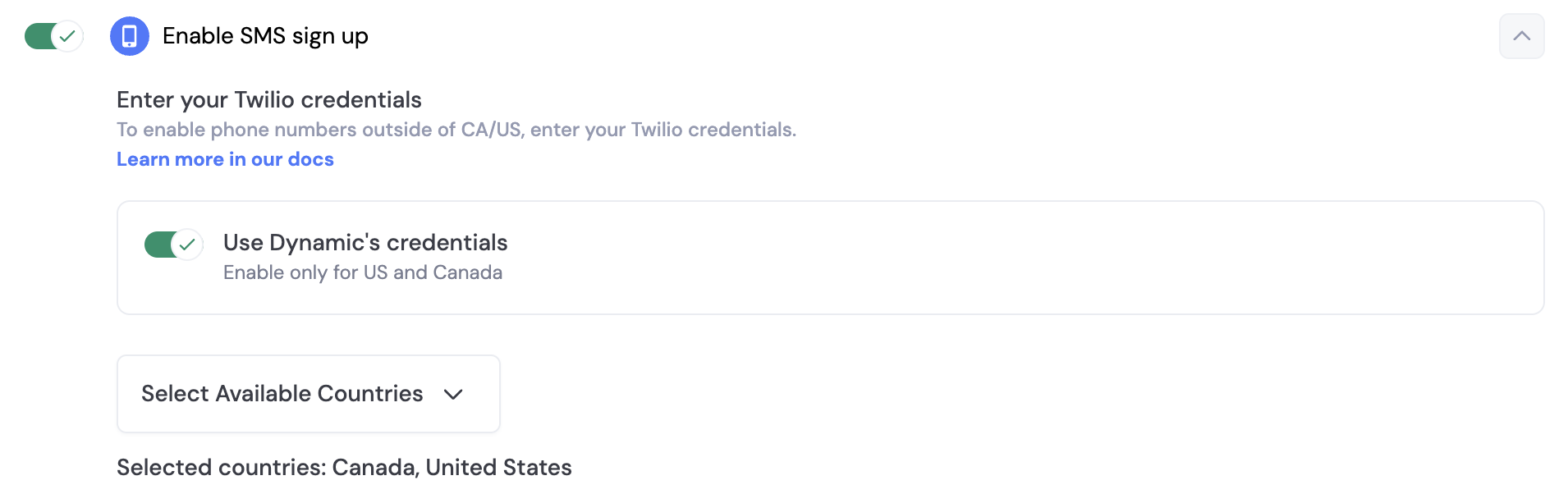 By default, you can use Dynamics credentials to send SMS messages to your users. However, if you want to send beyond US & Canada, you will need to set up your own Twilio account. In order to do this, you toggle off "Use Dynamic's credentials" and a section will open up for you, where you can enter your own credentials.
## SMS & Embedded Wallets
When you enable SMS sign-up, you can also enable embedded wallets for your users. This means that when a user signs up with their phone number, they will also receive a wallet that they can use to interact with your application.
In order to ensure your end users are adequately protected against attacks like sim swaps, we highly encourage you to [enable account MFA (TOTP) via Google Authenticator](/docs/react/authentication-methods/mfa).
## Using Dynamic UI
You can trigger Email and SMS signup/login using the Dynamic UI simply by calling the method to trigger the signup/login flow:
```typescript theme={"system"}
dynamicClient.ui.auth.show()
```
After the user has signed in successfully, you can also bring up our user profile interface, which allows your user
to view their wallet's address and balance, as well as editing their fields like email and phone number.
To show the user profile modal, call:
```typescript theme={"system"}
dynamicClient.ui.userProfile.show()
```
## Custom UI
The dynamic client authentication module enables user authentication via email or SMS. There are two steps - send then verify the OTP. After this point, the user will be logged in.
### Sending OTPs
The methods below can be used to send/resend one time passwords
```typescript theme={"system"}
// Send, retry and then verify OTP to an email
await dynamicClient.auth.email.sendOTP('someone@gmail.com')
await dynamicClient.auth.email.resendOTP()
// Send OTP to a phone number with retry
await dynamicClient.auth.sms.sendOTP({
dialCode: '1',
iso2: 'us',
phone: '2793334444',
})
await dynamicClient.auth.sms.resendOTP()
```
### Verifying OTPs
After the user has sent an OTP, you can verify it by calling the `verifyOTP` method.
```typescript theme={"system"}
await dynamicClient.auth.email.verifyOTP('received-token')
```
### Example
The example below demonstrates a React component that can send, resend and verify OTPs through email.
You can follow the same pattern for phone numbers but collect phone number, iso2 and dial code instead
of email address.
```typescript theme={"system"}
import { dynamicClient } from '
By default, you can use Dynamics credentials to send SMS messages to your users. However, if you want to send beyond US & Canada, you will need to set up your own Twilio account. In order to do this, you toggle off "Use Dynamic's credentials" and a section will open up for you, where you can enter your own credentials.
## SMS & Embedded Wallets
When you enable SMS sign-up, you can also enable embedded wallets for your users. This means that when a user signs up with their phone number, they will also receive a wallet that they can use to interact with your application.
In order to ensure your end users are adequately protected against attacks like sim swaps, we highly encourage you to [enable account MFA (TOTP) via Google Authenticator](/docs/react/authentication-methods/mfa).
## Using Dynamic UI
You can trigger Email and SMS signup/login using the Dynamic UI simply by calling the method to trigger the signup/login flow:
```typescript theme={"system"}
dynamicClient.ui.auth.show()
```
After the user has signed in successfully, you can also bring up our user profile interface, which allows your user
to view their wallet's address and balance, as well as editing their fields like email and phone number.
To show the user profile modal, call:
```typescript theme={"system"}
dynamicClient.ui.userProfile.show()
```
## Custom UI
The dynamic client authentication module enables user authentication via email or SMS. There are two steps - send then verify the OTP. After this point, the user will be logged in.
### Sending OTPs
The methods below can be used to send/resend one time passwords
```typescript theme={"system"}
// Send, retry and then verify OTP to an email
await dynamicClient.auth.email.sendOTP('someone@gmail.com')
await dynamicClient.auth.email.resendOTP()
// Send OTP to a phone number with retry
await dynamicClient.auth.sms.sendOTP({
dialCode: '1',
iso2: 'us',
phone: '2793334444',
})
await dynamicClient.auth.sms.resendOTP()
```
### Verifying OTPs
After the user has sent an OTP, you can verify it by calling the `verifyOTP` method.
```typescript theme={"system"}
await dynamicClient.auth.email.verifyOTP('received-token')
```
### Example
The example below demonstrates a React component that can send, resend and verify OTPs through email.
You can follow the same pattern for phone numbers but collect phone number, iso2 and dial code instead
of email address.
```typescript theme={"system"}
import { dynamicClient } from '