> ## Documentation Index
> Fetch the complete documentation index at: https://docs.dynamic.xyz/docs/llms.txt
> Use this file to discover all available pages before exploring further.
# Smart Wallets with ZeroDev (Account Abstraction)
When using account abstraction in your project to sponsor gas, batch transactions, or any other account abstraction features, you will likely want to get a ZeroDev kernel client to perform these operations.
You can use the `@dynamic-labs/zerodev-extension` package to create a ZeroDev kernel client for a wallet.
Here is how you can set up and create a kernel client.
The `@dynamic-labs/zerodev-extension` depends on the Viem Extension, so before
going through this setup, make sure to have the Viem Extension set up and
working. [Viem Extension Setup](/react-native/reference/wallets/viem)
# Setup
## Install ZeroDevExtension
Install the @dynamic-labs/zerodev-extension package:
```bash Shell theme={"system"}
npx expo install @dynamic-labs/zerodev-extension
```
```bash Shell theme={"system"}
npm install @dynamic-labs/zerodev-extension
```
```bash Shell theme={"system"}
yarn add @dynamic-labs/zerodev-extension
```
```bash Shell theme={"system"}
bun add @dynamic-labs/zerodev-extension
```
```bash Shell theme={"system"}
pnpm add @dynamic-labs/zerodev-extension
```
## Resolve File Resolution Error (Optional)
When running the ZeroDevExtension in your React Native application, you might encounter an error where Metro cannot resolve the `paymasterClient.js` file. This issue occurs because Metro tries to load `paymasterClient.js`, but the actual file is named `paymasterClient.ts`.
To fix this, you need to customize Metro's resolver in your `metro.config.js` file to handle TypeScript file extensions properly.
### Generate metro.config.js for Expo Projects
If you don't have a `metro.config.js` file in your project, you can generate one using the following command:
```bash Shell theme={"system"}
npx expo customize metro.config.js
```
### Customize Metro Resolver
Add the following code to your `metro.config.js` file to instruct Metro to resolve `.ts` files when it cannot find the corresponding `.js` files:
```js metro.config.js theme={"system"}
const { getDefaultConfig } = require('expo/metro-config')
const config = getDefaultConfig(__dirname)
/**
* Custom resolver to handle ZeroDev imports
*/
config.resolver.resolveRequest = (context, moduleName, platform) => {
try {
return context.resolveRequest(context, moduleName, platform)
} catch (error) {
if (moduleName.endsWith('.js')) {
const tsModuleName = moduleName.replace(/\.js$/, '.ts')
return context.resolveRequest(context, tsModuleName, platform)
}
throw error
}
}
module.exports = config
```
This modification allows Metro to attempt to resolve `.ts` files when it fails to find `.js` files, which fixes the resolution error for the `paymasterClient` file.
## Events Polyfill
ZeroDevExtension requires a polyfill for the Node.js events module. You can install the [events](https://www.npmjs.com/package/events) polyfill using one of the following commands:
```bash Shell theme={"system"}
npx expo install events
```
```bash Shell theme={"system"}
npm install events
```
```bash Shell theme={"system"}
yarn add events
```
```bash Shell theme={"system"}
bun add events
```
```bash Shell theme={"system"}
pnpm add events
```
## Integrate with your Dynamic client
To include the ZeroDev module in your Dynamic client, you need to extend the client with the ZeroDev extension:
```typescript dynamicClient.ts theme={"system"}
import { createClient } from '@dynamic-labs/client'
import { ReactNativeExtension } from '@dynamic-labs/react-native-extension'
import { ViemExtension } from '@dynamic-labs/viem-extension'
import { ZeroDevExtension } from '@dynamic-labs/zerodev-extension'
import 'fast-text-encoding' // Only required for Expo SDK 53 and below
const environmentId = process.env.EXPO_PUBLIC_ENVIRONMENT_ID as string
if (!environmentId) {
throw new Error('EXPO_PUBLIC_ENVIRONMENT_ID is required')
}
export const client = createClient({
environmentId,
appLogoUrl: 'https://demo.dynamic.xyz/favicon-32x32.png',
appName: 'React Native Stablecoin App',
})
.extend(ReactNativeExtension())
.extend(ViemExtension())
.extend(ZeroDevExtension())
```
The `fast-text-encoding` import is only required when using Expo SDK 53 and below. Expo SDK 54 and above have built-in text encoding support.
Now your setup is complete, and you have the ZeroDev module available in your Dynamic client.
# Usage
Now that you have the ZeroDev module in your Dynamic client, you can get the ZeroDev kernel client by using the `client.zeroDev.createKernelClient` method. Here is an example:
```typescript dynamicClient.ts theme={"system"}
import { PaymasterTypeEnum } from '@dynamic-labs/ethereum-aa'
import { ZerodevBundlerProvider } from '@dynamic-labs/sdk-api-core'
import { mainnet } from 'viem/chains'
import { client } from './dynamicClient'
export const getPrimaryWalletKernelClient = async () => {
const primaryWallet = client.wallets.primary
if (!primaryWallet) {
throw new Error('No primary wallet')
}
try {
const kernelClient = await client.zeroDev.createKernelClient({
wallet: primaryWallet,
chainId: mainnet.id,
paymaster: PaymasterTypeEnum.SPONSOR,
bundlerProvider: ZerodevBundlerProvider.Pimlico,
})
return kernelClient
} catch (error) {
console.error('Failed to create kernel client:', error)
throw new Error(
`Failed to create kernel client: ${error instanceof Error ? error.message : 'Unknown error'}`
)
}
}
```
Then, you can specify the paymaster and bundler URL in your dynamic environment configuration:
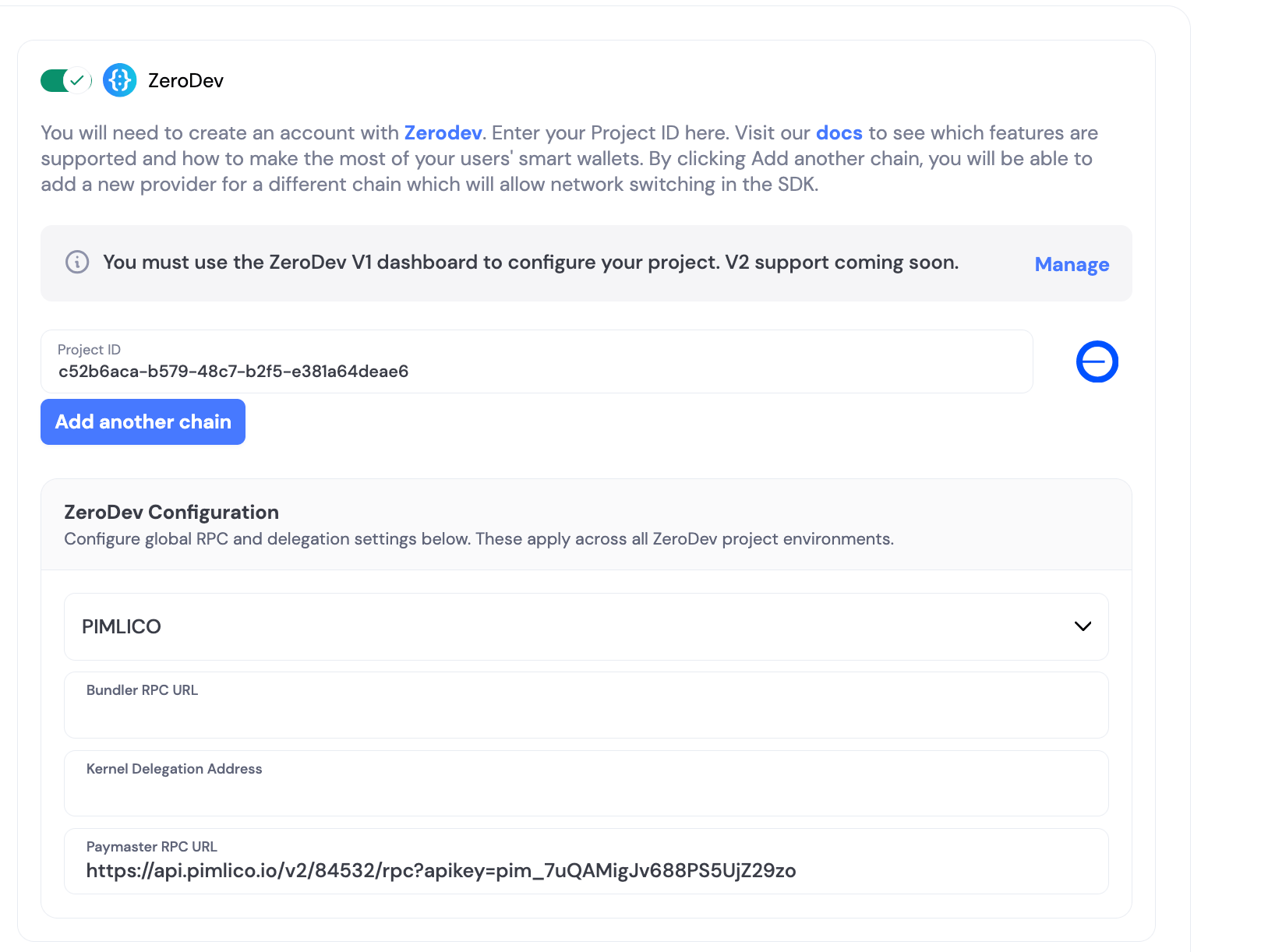 You can also use the `ZerodevBundlerProvider.Alchemy` or `ZerodevBundlerProvider.Gelato` provider to use the Alchemy or Gelato bundler services.
You can either use `PaymasterTypeEnum.SPONSOR` to sponsor all transactions or `PaymasterTypeEnum.NONE` to send a non-sponsored transaction.
**Two React Native-specific gotchas compared to the Web/React SDK:**
* **Use `paymaster`, not `withSponsorship`.** Pass `paymaster: PaymasterTypeEnum.SPONSOR` when creating the kernel client. The `withSponsorship: true` option used by the Web/React SDK does not apply here — sponsorship is configured at kernel-client creation time, not per user operation.
* **Set `bundlerProvider` explicitly.** React Native does not automatically pick up the bundler/paymaster provider from your Dynamic dashboard configuration the way the Web SDK does. Pass `bundlerProvider: ZerodevBundlerProvider.Pimlico` (or `Alchemy` / `Gelato`) to `createKernelClient` — otherwise the default may not match your dashboard and sponsorship will fail.
# Examples
## Sponsored Transactions
Sponsored transactions allow users to interact with your dApp without paying gas fees. The gas costs are covered by your application through a paymaster service.
### Simple Sponsored Transaction with `sendTransaction`
The kernel client exposes a viem-style `sendTransaction` method that accepts a `calls` array. Because `paymaster: PaymasterTypeEnum.SPONSOR` was set when creating the client, every call sent through it is sponsored — you do not pass any per-transaction sponsorship flag.
```typescript theme={"system"}
import { Hex, parseEther } from 'viem'
import { PaymasterTypeEnum } from '@dynamic-labs/ethereum-aa'
import { ZerodevBundlerProvider } from '@dynamic-labs/sdk-api-core'
import { client } from './dynamicClient'
const sendSponsoredEth = async (to: Hex, ethAmount: string) => {
const wallet = client.wallets.primary
if (!wallet || wallet.chain !== 'EVM') {
throw new Error('An EVM wallet is required')
}
const kernelClient = await client.zeroDev.createKernelClient({
wallet,
paymaster: PaymasterTypeEnum.SPONSOR,
bundlerProvider: ZerodevBundlerProvider.Pimlico,
})
const txHash = await kernelClient.sendTransaction({
calls: [
{
to,
value: parseEther(ethAmount),
data: '0x',
},
],
})
return txHash
}
```
### Basic Sponsored Transaction
Here's how to send a sponsored transaction:
```typescript theme={"system"}
import { encodeFunctionData, parseUnits } from 'viem'
import { getPrimaryWalletKernelClient } from './dynamicClient'
const sendSponsoredTransaction = async () => {
const kernelClient = await getPrimaryWalletKernelClient()
// Example: Transfer USDC tokens
const USDC_CONTRACT = '0xA0b86991c6218b36c1d19D4a2e9Eb0cE3606eB48' // ETH Mainnet USDC
const ERC20_ABI = [
{
inputs: [
{ internalType: 'address', name: 'to', type: 'address' },
{ internalType: 'uint256', name: 'amount', type: 'uint256' }
],
name: 'transfer',
outputs: [{ internalType: 'bool', name: '', type: 'bool' }],
stateMutability: 'nonpayable',
type: 'function'
}
]
const recipientAddress = '0x1234567890123456789012345678901234567890'
const amount = '10' // 10 USDC
try {
const usdcAmount = parseUnits(amount, 6)
const transferData = encodeFunctionData({
abi: ERC20_ABI,
functionName: 'transfer',
args: [recipientAddress as `0x${string}`, usdcAmount],
})
const userOpHash = await kernelClient.sendUserOperation({
callData: await kernelClient.account.encodeCalls([
{
to: USDC_CONTRACT as `0x${string}`,
value: BigInt(0),
data: transferData,
},
]),
})
console.log('User operation sent, hash:', userOpHash)
console.log('Waiting for transaction confirmation...')
const { receipt } = await kernelClient.waitForUserOperationReceipt({
hash: userOpHash,
})
const transactionHash = receipt.transactionHash
console.log('Transaction completed:', transactionHash)
return transactionHash
} catch (error) {
console.error('Failed to send sponsored transaction:', error)
throw error
}
}
```
### Sponsored Transaction with Custom Configuration
You can customize the paymaster and bundler settings for different use cases:
```typescript theme={"system"}
import { PaymasterTypeEnum } from '@dynamic-labs/ethereum-aa'
import { ZerodevBundlerProvider } from '@dynamic-labs/sdk-api-core'
import { client } from './dynamicClient'
import { base } from 'viem/chains'
const sendCustomSponsoredTransaction = async () => {
const primaryWallet = client.wallets.primary
if (!primaryWallet) {
throw new Error('No primary wallet')
}
// Create kernel client with custom configuration
const kernelClient = await client.zeroDev.createKernelClient({
wallet: primaryWallet,
chainId: base.id, // ETH Mainnet
paymaster: PaymasterTypeEnum.SPONSOR, // Sponsor all gas costs
bundlerProvider: ZerodevBundlerProvider.Pimlico, // Use Pimlico bundler
})
// Your transaction logic here
const userOpHash = await kernelClient.sendUserOperation({
callData: await kernelClient.account.encodeCalls([
{
to: '0x1234567890123456789012345678901234567890',
value: BigInt(0),
data: '0x', // Your transaction data
},
]),
})
return userOpHash
}
```
### Troubleshooting: `AA20 account not deployed`
If a sponsored user operation fails with an error like:
```
validation reverted: [reason]: AA20 account not deployed
```
the bundler handling the request doesn't support EIP-7702, which is the default mechanism Dynamic uses to enable smart-account features on existing EOAs. React Native does not automatically select a 7702-compatible bundler based on your Dynamic dashboard configuration, so the fix is to set it explicitly when creating the kernel client:
```typescript theme={"system"}
const kernelClient = await client.zeroDev.createKernelClient({
wallet,
paymaster: PaymasterTypeEnum.SPONSOR,
bundlerProvider: ZerodevBundlerProvider.Pimlico,
})
```
Pimlico is the recommended default for EIP-7702 sponsorship on React Native.
## Conditionally Sponsored Transactions
If your app decides at runtime whether to sponsor a transaction — for example, your backend evaluates each transaction and returns a sponsorship decision — pass that decision as the `paymaster` value when creating the kernel client. `PaymasterTypeEnum.SPONSOR` sends the transaction through your paymaster; `PaymasterTypeEnum.NONE` creates a kernel client without a paymaster, so the user pays the gas.
```typescript theme={"system"}
import { Hex } from 'viem'
import { PaymasterTypeEnum } from '@dynamic-labs/ethereum-aa'
import { ZerodevBundlerProvider } from '@dynamic-labs/sdk-api-core'
import { client } from './dynamicClient'
const sendConditionallySponsoredTransaction = async (
shouldSponsor: boolean,
transaction: { to: Hex; value: bigint; data: Hex }
) => {
const wallet = client.wallets.primary
if (!wallet || wallet.chain !== 'EVM') {
throw new Error('An EVM wallet is required')
}
const kernelClient = await client.zeroDev.createKernelClient({
wallet,
paymaster: shouldSponsor
? PaymasterTypeEnum.SPONSOR
: PaymasterTypeEnum.NONE,
bundlerProvider: ZerodevBundlerProvider.Pimlico,
})
const txHash = await kernelClient.sendTransaction({
calls: [transaction],
})
return txHash
}
```
With `PaymasterTypeEnum.NONE`, gas is paid in the network's native token from
the smart wallet's balance. For kernel smart accounts this is the smart
wallet's contract address (a different address from the signing wallet); for
EIP-7702 wallets the smart wallet is the user's own wallet address. Either
way, that address must hold enough native token to cover the transaction.
## Batch Transactions
Batch transactions allow you to execute multiple operations in a single transaction, reducing gas costs and improving user experience.
### Batch Transaction Example
This example demonstrates how you can use a ZeroDev kernel client to perform a batched transaction:
```typescript theme={"system"}
import { encodeFunctionData } from 'viem'
import { PaymasterTypeEnum } from '@dynamic-labs/ethereum-aa'
import { ZerodevBundlerProvider } from '@dynamic-labs/sdk-api-core'
import { getPrimaryWalletKernelClient } from './dynamicClient'
import { client } from './dynamicClient'
const contractAddress = '0x123'
const contractABI = [
{
inputs: [{ internalType: 'address', name: '_to', type: 'address' }],
name: 'mint',
outputs: [],
stateMutability: 'nonpayable',
type: 'function',
},
]
const sendBatchedTransactions = async () => {
const primaryWallet = client.wallets.primary
if (!primaryWallet) {
throw new Error('No primary wallet')
}
const kernelClient = await getPrimaryWalletKernelClient()
const { account } = kernelClient
const hash = await kernelClient.sendUserOperation({
callData: await account.encodeCalls([
{
data: encodeFunctionData({
abi: contractABI,
args: [primaryWallet.address],
functionName: 'mint',
}),
to: contractAddress,
value: BigInt(0),
},
{
data: encodeFunctionData({
abi: contractABI,
args: [primaryWallet.address],
functionName: 'mint',
}),
to: contractAddress,
value: BigInt(0),
},
]),
})
return hash
}
```
You can also use the `ZerodevBundlerProvider.Alchemy` or `ZerodevBundlerProvider.Gelato` provider to use the Alchemy or Gelato bundler services.
You can either use `PaymasterTypeEnum.SPONSOR` to sponsor all transactions or `PaymasterTypeEnum.NONE` to send a non-sponsored transaction.
**Two React Native-specific gotchas compared to the Web/React SDK:**
* **Use `paymaster`, not `withSponsorship`.** Pass `paymaster: PaymasterTypeEnum.SPONSOR` when creating the kernel client. The `withSponsorship: true` option used by the Web/React SDK does not apply here — sponsorship is configured at kernel-client creation time, not per user operation.
* **Set `bundlerProvider` explicitly.** React Native does not automatically pick up the bundler/paymaster provider from your Dynamic dashboard configuration the way the Web SDK does. Pass `bundlerProvider: ZerodevBundlerProvider.Pimlico` (or `Alchemy` / `Gelato`) to `createKernelClient` — otherwise the default may not match your dashboard and sponsorship will fail.
# Examples
## Sponsored Transactions
Sponsored transactions allow users to interact with your dApp without paying gas fees. The gas costs are covered by your application through a paymaster service.
### Simple Sponsored Transaction with `sendTransaction`
The kernel client exposes a viem-style `sendTransaction` method that accepts a `calls` array. Because `paymaster: PaymasterTypeEnum.SPONSOR` was set when creating the client, every call sent through it is sponsored — you do not pass any per-transaction sponsorship flag.
```typescript theme={"system"}
import { Hex, parseEther } from 'viem'
import { PaymasterTypeEnum } from '@dynamic-labs/ethereum-aa'
import { ZerodevBundlerProvider } from '@dynamic-labs/sdk-api-core'
import { client } from './dynamicClient'
const sendSponsoredEth = async (to: Hex, ethAmount: string) => {
const wallet = client.wallets.primary
if (!wallet || wallet.chain !== 'EVM') {
throw new Error('An EVM wallet is required')
}
const kernelClient = await client.zeroDev.createKernelClient({
wallet,
paymaster: PaymasterTypeEnum.SPONSOR,
bundlerProvider: ZerodevBundlerProvider.Pimlico,
})
const txHash = await kernelClient.sendTransaction({
calls: [
{
to,
value: parseEther(ethAmount),
data: '0x',
},
],
})
return txHash
}
```
### Basic Sponsored Transaction
Here's how to send a sponsored transaction:
```typescript theme={"system"}
import { encodeFunctionData, parseUnits } from 'viem'
import { getPrimaryWalletKernelClient } from './dynamicClient'
const sendSponsoredTransaction = async () => {
const kernelClient = await getPrimaryWalletKernelClient()
// Example: Transfer USDC tokens
const USDC_CONTRACT = '0xA0b86991c6218b36c1d19D4a2e9Eb0cE3606eB48' // ETH Mainnet USDC
const ERC20_ABI = [
{
inputs: [
{ internalType: 'address', name: 'to', type: 'address' },
{ internalType: 'uint256', name: 'amount', type: 'uint256' }
],
name: 'transfer',
outputs: [{ internalType: 'bool', name: '', type: 'bool' }],
stateMutability: 'nonpayable',
type: 'function'
}
]
const recipientAddress = '0x1234567890123456789012345678901234567890'
const amount = '10' // 10 USDC
try {
const usdcAmount = parseUnits(amount, 6)
const transferData = encodeFunctionData({
abi: ERC20_ABI,
functionName: 'transfer',
args: [recipientAddress as `0x${string}`, usdcAmount],
})
const userOpHash = await kernelClient.sendUserOperation({
callData: await kernelClient.account.encodeCalls([
{
to: USDC_CONTRACT as `0x${string}`,
value: BigInt(0),
data: transferData,
},
]),
})
console.log('User operation sent, hash:', userOpHash)
console.log('Waiting for transaction confirmation...')
const { receipt } = await kernelClient.waitForUserOperationReceipt({
hash: userOpHash,
})
const transactionHash = receipt.transactionHash
console.log('Transaction completed:', transactionHash)
return transactionHash
} catch (error) {
console.error('Failed to send sponsored transaction:', error)
throw error
}
}
```
### Sponsored Transaction with Custom Configuration
You can customize the paymaster and bundler settings for different use cases:
```typescript theme={"system"}
import { PaymasterTypeEnum } from '@dynamic-labs/ethereum-aa'
import { ZerodevBundlerProvider } from '@dynamic-labs/sdk-api-core'
import { client } from './dynamicClient'
import { base } from 'viem/chains'
const sendCustomSponsoredTransaction = async () => {
const primaryWallet = client.wallets.primary
if (!primaryWallet) {
throw new Error('No primary wallet')
}
// Create kernel client with custom configuration
const kernelClient = await client.zeroDev.createKernelClient({
wallet: primaryWallet,
chainId: base.id, // ETH Mainnet
paymaster: PaymasterTypeEnum.SPONSOR, // Sponsor all gas costs
bundlerProvider: ZerodevBundlerProvider.Pimlico, // Use Pimlico bundler
})
// Your transaction logic here
const userOpHash = await kernelClient.sendUserOperation({
callData: await kernelClient.account.encodeCalls([
{
to: '0x1234567890123456789012345678901234567890',
value: BigInt(0),
data: '0x', // Your transaction data
},
]),
})
return userOpHash
}
```
### Troubleshooting: `AA20 account not deployed`
If a sponsored user operation fails with an error like:
```
validation reverted: [reason]: AA20 account not deployed
```
the bundler handling the request doesn't support EIP-7702, which is the default mechanism Dynamic uses to enable smart-account features on existing EOAs. React Native does not automatically select a 7702-compatible bundler based on your Dynamic dashboard configuration, so the fix is to set it explicitly when creating the kernel client:
```typescript theme={"system"}
const kernelClient = await client.zeroDev.createKernelClient({
wallet,
paymaster: PaymasterTypeEnum.SPONSOR,
bundlerProvider: ZerodevBundlerProvider.Pimlico,
})
```
Pimlico is the recommended default for EIP-7702 sponsorship on React Native.
## Conditionally Sponsored Transactions
If your app decides at runtime whether to sponsor a transaction — for example, your backend evaluates each transaction and returns a sponsorship decision — pass that decision as the `paymaster` value when creating the kernel client. `PaymasterTypeEnum.SPONSOR` sends the transaction through your paymaster; `PaymasterTypeEnum.NONE` creates a kernel client without a paymaster, so the user pays the gas.
```typescript theme={"system"}
import { Hex } from 'viem'
import { PaymasterTypeEnum } from '@dynamic-labs/ethereum-aa'
import { ZerodevBundlerProvider } from '@dynamic-labs/sdk-api-core'
import { client } from './dynamicClient'
const sendConditionallySponsoredTransaction = async (
shouldSponsor: boolean,
transaction: { to: Hex; value: bigint; data: Hex }
) => {
const wallet = client.wallets.primary
if (!wallet || wallet.chain !== 'EVM') {
throw new Error('An EVM wallet is required')
}
const kernelClient = await client.zeroDev.createKernelClient({
wallet,
paymaster: shouldSponsor
? PaymasterTypeEnum.SPONSOR
: PaymasterTypeEnum.NONE,
bundlerProvider: ZerodevBundlerProvider.Pimlico,
})
const txHash = await kernelClient.sendTransaction({
calls: [transaction],
})
return txHash
}
```
With `PaymasterTypeEnum.NONE`, gas is paid in the network's native token from
the smart wallet's balance. For kernel smart accounts this is the smart
wallet's contract address (a different address from the signing wallet); for
EIP-7702 wallets the smart wallet is the user's own wallet address. Either
way, that address must hold enough native token to cover the transaction.
## Batch Transactions
Batch transactions allow you to execute multiple operations in a single transaction, reducing gas costs and improving user experience.
### Batch Transaction Example
This example demonstrates how you can use a ZeroDev kernel client to perform a batched transaction:
```typescript theme={"system"}
import { encodeFunctionData } from 'viem'
import { PaymasterTypeEnum } from '@dynamic-labs/ethereum-aa'
import { ZerodevBundlerProvider } from '@dynamic-labs/sdk-api-core'
import { getPrimaryWalletKernelClient } from './dynamicClient'
import { client } from './dynamicClient'
const contractAddress = '0x123'
const contractABI = [
{
inputs: [{ internalType: 'address', name: '_to', type: 'address' }],
name: 'mint',
outputs: [],
stateMutability: 'nonpayable',
type: 'function',
},
]
const sendBatchedTransactions = async () => {
const primaryWallet = client.wallets.primary
if (!primaryWallet) {
throw new Error('No primary wallet')
}
const kernelClient = await getPrimaryWalletKernelClient()
const { account } = kernelClient
const hash = await kernelClient.sendUserOperation({
callData: await account.encodeCalls([
{
data: encodeFunctionData({
abi: contractABI,
args: [primaryWallet.address],
functionName: 'mint',
}),
to: contractAddress,
value: BigInt(0),
},
{
data: encodeFunctionData({
abi: contractABI,
args: [primaryWallet.address],
functionName: 'mint',
}),
to: contractAddress,
value: BigInt(0),
},
]),
})
return hash
}
```