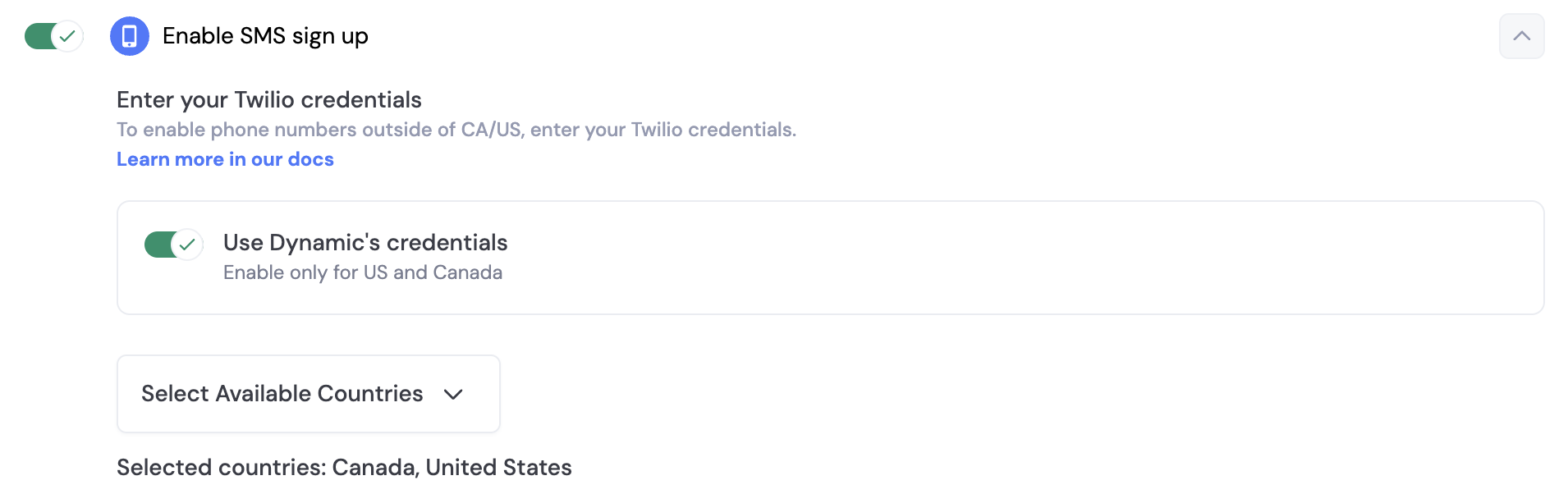
 By default, you can use Dynamics credentials to send SMS messages to your users. However, if you want to send beyond US & Canada, you will need to set up your own Twilio account. In order to do this, you toggle off "Use Dynamic's credentials" and a section will open up for you, where you can enter your own credentials.
## SMS & Embedded Wallets
When you enable SMS sign-up, you can also enable embedded wallets for your users. This means that when a user signs up with their phone number, they will also receive a wallet that they can use to interact with your application.
In order to ensure your end users are adequately protected against attacks like sim swaps, we highly encourage you to [enable account MFA (TOTP) via Google Authenticator](/react/authentication-methods/mfa).
## Using our UI
Once toggled on, these methods will be available in the Dynamic widget.
## Using your UI
We can create our SMS signup/login form by using the [`useConnectWithOtp` hook](/react/reference/hooks/login-user-management/useconnectwithotp)
```tsx React theme={"system"}
import { FC, FormEventHandler } from 'react';
import { useConnectWithOtp, useDynamicContext } from '@dynamic-labs/sdk-react-core';
const ConnectWithSmsView: FC = () => {
const { user } = useDynamicContext()
const { connectWithSms, verifyOneTimePassword } = useConnectWithOtp();
const onSubmitSmsHandler: FormEventHandler
By default, you can use Dynamics credentials to send SMS messages to your users. However, if you want to send beyond US & Canada, you will need to set up your own Twilio account. In order to do this, you toggle off "Use Dynamic's credentials" and a section will open up for you, where you can enter your own credentials.
## SMS & Embedded Wallets
When you enable SMS sign-up, you can also enable embedded wallets for your users. This means that when a user signs up with their phone number, they will also receive a wallet that they can use to interact with your application.
In order to ensure your end users are adequately protected against attacks like sim swaps, we highly encourage you to [enable account MFA (TOTP) via Google Authenticator](/react/authentication-methods/mfa).
## Using our UI
Once toggled on, these methods will be available in the Dynamic widget.
## Using your UI
We can create our SMS signup/login form by using the [`useConnectWithOtp` hook](/react/reference/hooks/login-user-management/useconnectwithotp)
```tsx React theme={"system"}
import { FC, FormEventHandler } from 'react';
import { useConnectWithOtp, useDynamicContext } from '@dynamic-labs/sdk-react-core';
const ConnectWithSmsView: FC = () => {
const { user } = useDynamicContext()
const { connectWithSms, verifyOneTimePassword } = useConnectWithOtp();
const onSubmitSmsHandler: FormEventHandlerAuthenticated user:
{JSON.stringify(user, null, 2)}
)}