> ## Documentation Index
> Fetch the complete documentation index at: https://docs.dynamic.xyz/docs/llms.txt
> Use this file to discover all available pages before exploring further.
# Fund from External Wallet
For new React apps, we recommend the JavaScript SDK with React Hooks (`@dynamic-labs-sdk/react-hooks`) instead of the legacy React SDK documented here. The JS SDK comes with many benefits such as a much smaller bundle size and other optimizations. Use the [React quickstart (JavaScript SDK)](/javascript/reference/react-quickstart) to get started.
This guide is currently React only.
## Introduction
As one of the funding options for users, you may want to allow them to fund their wallet from an external wallet.
To do so, all you need to do is turn it on in the [Funding tab in your Dynamic developer dashboard](https://app.dynamic.xyz/dashboard/funding).
If you open the configuration section for this option, you'll also be able to configure the following:
* The default currency/token to fund
* The suggested minimum amount to fund
* Whether the amount is a suggestion or a requirement
All of the above configurations are extra and optional.
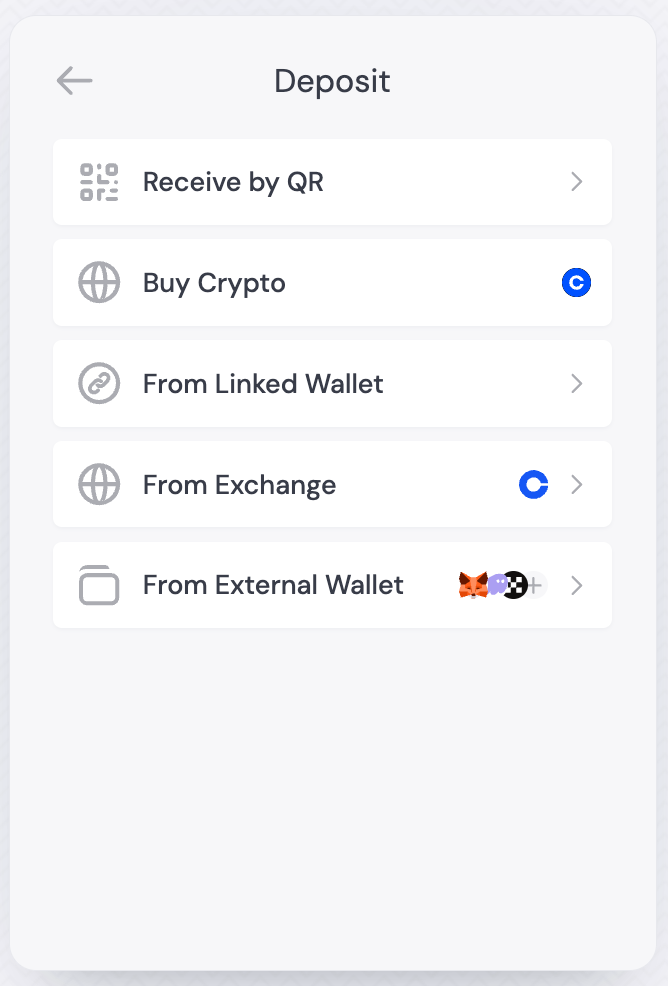
Once enabled, you'll see "Fund from External Wallet" as an option in the deposit screen.
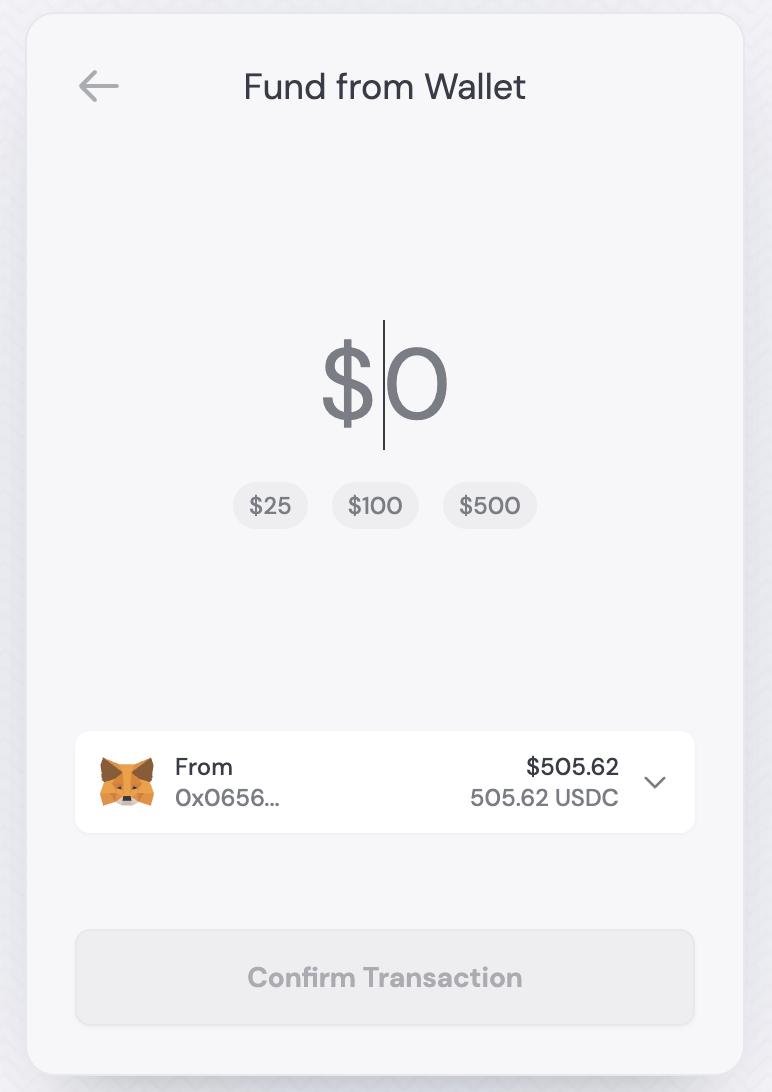
In the initial step, users will be able to select the external wallet they want to fund their wallet from, and following this, they can choose the amount and token:
## Related
* **[useFundWithWallet](/react/reference/hooks/funding/usefundwithwallet)** - Programmatic external wallet funding
* **[usePayWithDynamic](/react/reference/hooks/funding/usepaywithdynamic)** - Unified payment flow with all funding options
## Open from your app
Use the SDK UI to present the deposit options (including "Fund from External Wallet") after enabling them in the Dashboard.
Use the hook to open the funding options (which includes "Fund from External Wallet"):
```tsx React theme={"system"}
import { useOpenFundingOptions } from '@dynamic-labs/sdk-react-core'
const FundFromExternalWallet = () => {
const { openFundingOptions } = useOpenFundingOptions()
return (
)
}
```
 In the initial step, users will be able to select the external wallet they want to fund their wallet from, and following this, they can choose the amount and token:
 ## Related
* **[useFundWithWallet](/react/reference/hooks/funding/usefundwithwallet)** - Programmatic external wallet funding
* **[usePayWithDynamic](/react/reference/hooks/funding/usepaywithdynamic)** - Unified payment flow with all funding options
## Open from your app
Use the SDK UI to present the deposit options (including "Fund from External Wallet") after enabling them in the Dashboard.
Use the hook to open the funding options (which includes "Fund from External Wallet"):
```tsx React theme={"system"}
import { useOpenFundingOptions } from '@dynamic-labs/sdk-react-core'
const FundFromExternalWallet = () => {
const { openFundingOptions } = useOpenFundingOptions()
return (
)
}
```
## Related
* **[useFundWithWallet](/react/reference/hooks/funding/usefundwithwallet)** - Programmatic external wallet funding
* **[usePayWithDynamic](/react/reference/hooks/funding/usepaywithdynamic)** - Unified payment flow with all funding options
## Open from your app
Use the SDK UI to present the deposit options (including "Fund from External Wallet") after enabling them in the Dashboard.
Use the hook to open the funding options (which includes "Fund from External Wallet"):
```tsx React theme={"system"}
import { useOpenFundingOptions } from '@dynamic-labs/sdk-react-core'
const FundFromExternalWallet = () => {
const { openFundingOptions } = useOpenFundingOptions()
return (
)
}
```