> ## Documentation Index
> Fetch the complete documentation index at: https://docs.dynamic.xyz/docs/llms.txt
> Use this file to discover all available pages before exploring further.

# Circle

<Card title="Recommended: JavaScript SDK with React Hooks" icon="react" color="#4779FE">
  For new React apps, we recommend the JavaScript SDK with React Hooks (`@dynamic-labs-sdk/react-hooks`) instead of the legacy React SDK documented here. The JS SDK comes with many benefits such as a much smaller bundle size and other optimizations. Use the [React quickstart (JavaScript SDK)](/javascript/reference/react-quickstart) to get started.
</Card>

<Note>This guide is currently React only.</Note>

This tutorial guides you through using Dynamic as a signer for Circle Smart Accounts. You can refer to [this doc to learn more about Circle’s Modular Wallets offering](https://developers.circle.com/w3s/modular-wallets-quickstart).

## Setup

1. Register [a Circle Developer account](https://console.circle.com/signup). In [the Configurator section of the Circle Developer Console under Modular Wallets](https://console.circle.com/wallets/modular/configurator), grab your Client URL, and create a new Client Key.

2. Register [a Dynamic account](https://app.dynamic.xyz/). Grab your environment ID from [the SDK & API keys page of the Dynamic Dashboard](https://app.dynamic.xyz/dashboard/developer/api).

3. In [the Chains and Networks page of the Dynamic Dashboard](https://app.dynamic.xyz/dashboard/chains-and-networks), enable the EVM network(s) you want to use with Circle. In this example we use Polygon Amoy, so please make sure that's enabled.

## Code Implementation

For this guide, we'll be using React and TypeScript. If you don't already have an app created, check out our [Quickstart](/react/reference/quickstart) guide.

1. You'll need to install the Circle SDK dependency by running:

```bash theme={"system"}
npm install @circle-fin/modular-wallets-core
# or
yarn add @circle-fin/modular-wallets-core
# or
pnpm add @circle-fin/modular-wallets-core
# or
bun add @circle-fin/modular-wallets-core
```

2. Create a `.env` file in the project directory and add the following environment variables:

```
REACT_APP_CIRCLE_CLIENT_KEY=your_circle_client_key
REACT_APP_CIRCLE_CLIENT_URL=your_circle_client_url
```

Note: If you're using Next.js, replace `REACT_APP_` with `NEXT_PUBLIC_` and for Vite, use `VITE_`.

3. In `src/App.js`, replace the value for the `environmentId` with your own Dynamic environment ID.

4. Navigate to `src/Main.js`, and replace the current contents with the following:

```jsx theme={"system"}
import React, { useEffect, useState } from "react"
import { createPublicClient, parseEther } from "viem";
import { createBundlerClient } from "viem/account-abstraction";
import { polygonAmoy } from "viem/chains";
import { isEthereumWallet } from "@dynamic-labs/ethereum";
import { useDynamicContext, DynamicWidget } from "@dynamic-labs/sdk-react-core";

import {
  toCircleSmartAccount,
  toModularTransport,
  walletClientToLocalAccount,
} from "@circle-fin/modular-wallets-core";

const clientKey = process.env.REACT_APP_CIRCLE_CLIENT_KEY!;
const clientUrl = process.env.REACT_APP_CIRCLE_CLIENT_URL!;

// Create Circle transports
const modularTransport = toModularTransport(
  `${clientUrl}/polygonAmoy`,
  clientKey
);

// Create a public client
const client = createPublicClient({
  chain: polygonAmoy,
  transport: modularTransport,
});

// Create a bundler client
const bundlerClient = createBundlerClient({
  chain: polygonAmoy,
  transport: modularTransport,
});

export const Main = () => {
  const { primaryWallet } = useDynamicContext();
  const [account, setAccount] = useState<any>(undefined);
  const [hash, setHash] = useState<string | undefined>(undefined);
  const [userOpHash, setUserOpHash] = useState<string | undefined>(undefined);

  useEffect(() => {
    setSigner();

    async function setSigner() {
      if (!primaryWallet) {
        // Reset the account if the wallet is not connected
        setAccount(undefined);
        return;
      }

      if (!isEthereumWallet(primaryWallet)) {
        throw new Error("This wallet is not an Ethereum wallet");
      }

      const dynamicProvider = await primaryWallet.getWalletClient();

      toCircleSmartAccount({
        client,
        owner: walletClientToLocalAccount(dynamicProvider), // Transform the wallet client to a local account
      }).then(setAccount);
    }
  }, [primaryWallet]);

  const sendUserOperation = async (event: React.FormEvent<HTMLFormElement>) => {
    try {
      event.preventDefault();
      if (!account) return;

      const formData = new FormData(event.currentTarget);
      const to = formData.get("to") as `0x${string}`;
      const value = formData.get("value") as string;

      const hash = await bundlerClient.sendUserOperation({
        account,
        calls: [
          {
            to,
            value: parseEther(value),
          },
        ],
      });

      setUserOpHash(hash);

      const { receipt } = await bundlerClient.waitForUserOperationReceipt({
        hash,
      });

      setHash(receipt.transactionHash);
    } catch (error) {
      if (error instanceof Error) {
        alert(error.message);
        console.error(error);
      }
    }
  };

  if (!primaryWallet) return <DynamicWidget />

  return (
    <div>
      {primaryWallet && !account ? (
        <p>Loading...</p>
      ) : (
        <>
          <p>Address: {account?.address}</p>
          <h2>Send User Operation</h2>
          <form onSubmit={sendUserOperation}>
            <input name="to" placeholder="Address" />
            <input name="value" placeholder="Amount (ETH)" />
            <button type="submit">Send</button>
            {userOpHash && <p>User Operation Hash: {userOpHash}</p>}
            {hash && <p>Transaction Hash: {hash}</p>}
          </form>
        </>
      )}
    </div>
  )
```

5. Run the app by executing:

```bash theme={"system"}
npm start
# or
yarn start
# or
pnpm start
# or
bun run start
```

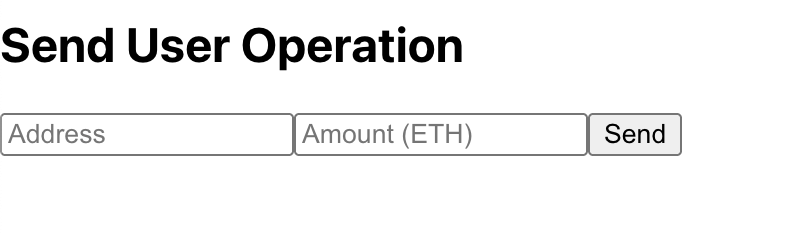
Check out the UI; once you sign up/login, you should see the following:

<Frame>
  <img src="https://mintcdn.com/dynamic-docs/DXbjtpFZjzIwv2VQ/images/circle/circle-example-app-ui.png?fit=max&auto=format&n=DXbjtpFZjzIwv2VQ&q=85&s=aa94a9e9b95c47fa0b2ce3916e790769" width="788" height="234" data-path="images/circle/circle-example-app-ui.png" />
</Frame>

6. Add a valid address to send to, and an amount that is within your wallet's balance plus a reasonable gas fee. Click on the "Send" button, and you should see the transaction hash in the UI!

## Troubleshooting

**Problem:** `Execution reverted for an unknown reason`

**Solution:** This is most likely due to the account not having enough ETH to pay for the transfer, make sure your smart wallet is funded!