> ## Documentation Index
> Fetch the complete documentation index at: https://docs.dynamic.xyz/docs/llms.txt
> Use this file to discover all available pages before exploring further.

# Crossmint

<Card title="Recommended: JavaScript SDK with React Hooks" icon="react" color="#4779FE">
  For new React apps, we recommend the JavaScript SDK with React Hooks (`@dynamic-labs-sdk/react-hooks`) instead of the legacy React SDK documented here. The JS SDK comes with many benefits such as a much smaller bundle size and other optimizations. Use the [React quickstart (JavaScript SDK)](/javascript/reference/react-quickstart) to get started.
</Card>

<Note>This guide is currently React only.</Note>

## Step-by-Step Guide

This guide shows you how to use Dynamic for authentication and as a signer for Crossmint Smart Wallets.

<Steps>
  <Step title="Create a Crossmint API Key">
    The first step is to obtain a client-side API key from Crossmint.

    1. Navigate to the "Integrate" section on the left navigation bar of [the Crossmint console](https://www.crossmint.com/console), and ensure you're on [the "API Keys" tab](https://www.crossmint.com/console/projects/apiKeys).
    2. Within the **Client-side keys** section, click the "Create new key" button in the top right.
    3. On the authorized origins section, enter `http://localhost:3000` and click "Add origin".
    4. Next, check the scopes labeled `wallets.create`, `wallets.read`, `users.create`.
    5. Check the "JWT Auth" box.
    6. Finally, create your key and save it for subsequent steps.
  </Step>

  <Step title="Configure Dynamic Authentication for your API Key">
    After the key is generated, you need to set it to require Dynamic auth tokens for authorization.

    1. Go to the Dynamic dashboard at [https://app.dynamic.xyz/](https://app.dynamic.xyz/)
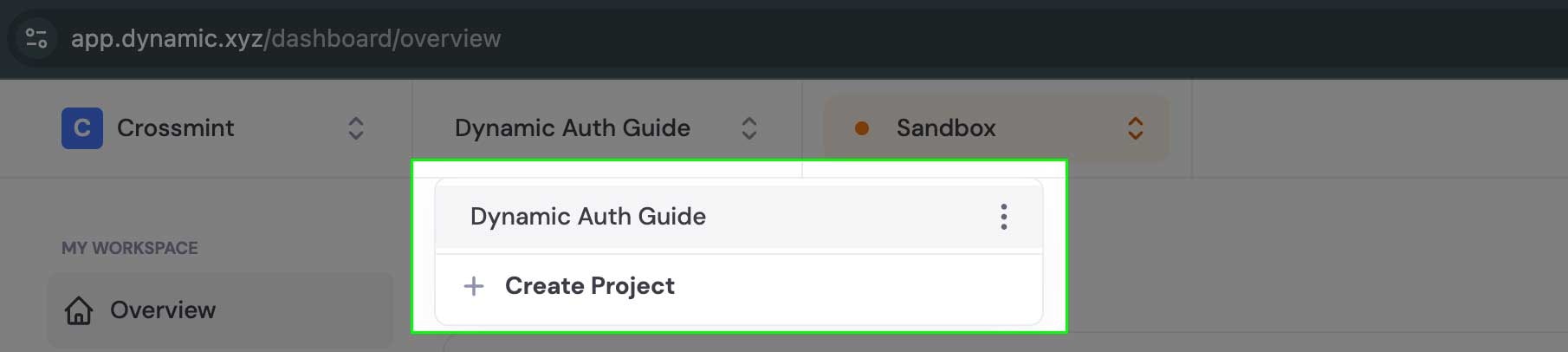
    2. Select an existing project or create a new one

    <Info>
      You need to make sure you're using live keys for mainnets and sandbox keys for staging/testnets.
    </Info>

    <Frame>
      <img src="https://mintcdn.com/dynamic-docs/DXbjtpFZjzIwv2VQ/images/crossmint/crossmint-1.jpg?fit=max&auto=format&n=DXbjtpFZjzIwv2VQ&q=85&s=f0b1196e88c137923e4f6d04390fc867" alt="Dynamic Dashboard" width="1810" height="406" data-path="images/crossmint/crossmint-1.jpg" />
    </Frame>

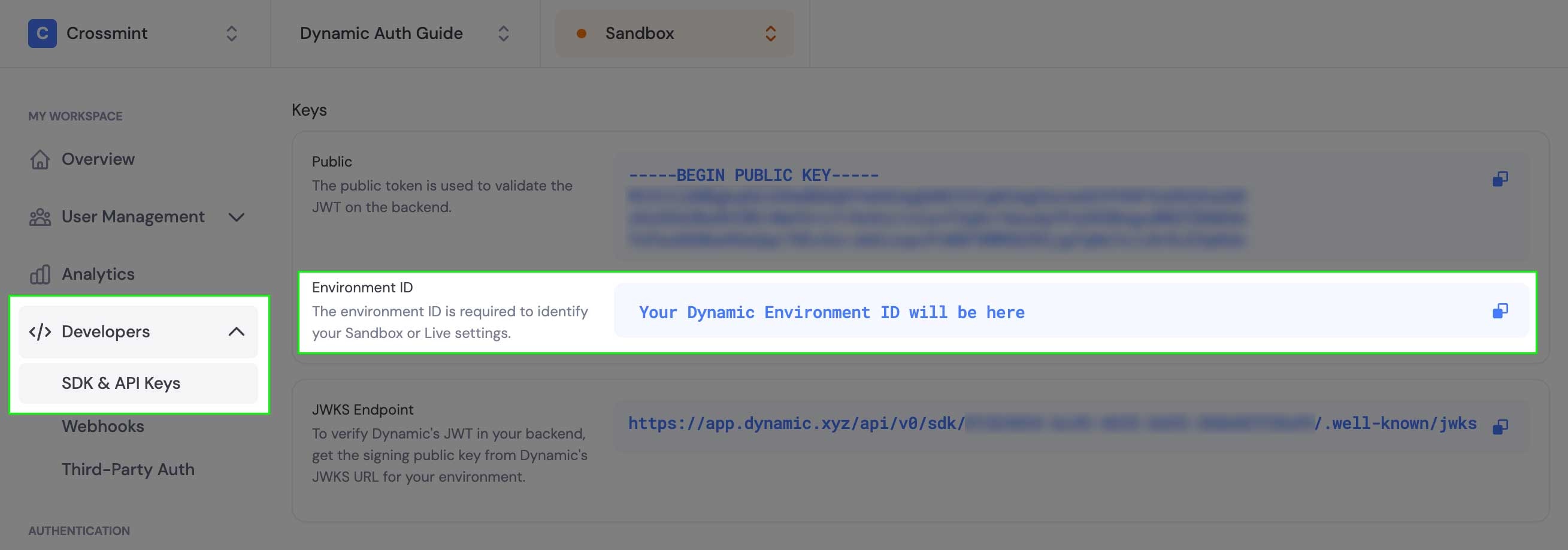
    3. Expand the "Developers" section in the left-hand navigation and select "SDK and API Keys" to find your Dynamic Environment ID.
    <Frame>
      <img src="https://mintcdn.com/dynamic-docs/DXbjtpFZjzIwv2VQ/images/crossmint/crossmint-2.jpg?fit=max&auto=format&n=DXbjtpFZjzIwv2VQ&q=85&s=84f0eca44b5e60b3529a0c11a782db63" alt="Dynamic Dashboard" width="2618" height="918" data-path="images/crossmint/crossmint-2.jpg" />
    </Frame>

    4. Copy the Dynamic Environment ID and return to the Crossmint developer console
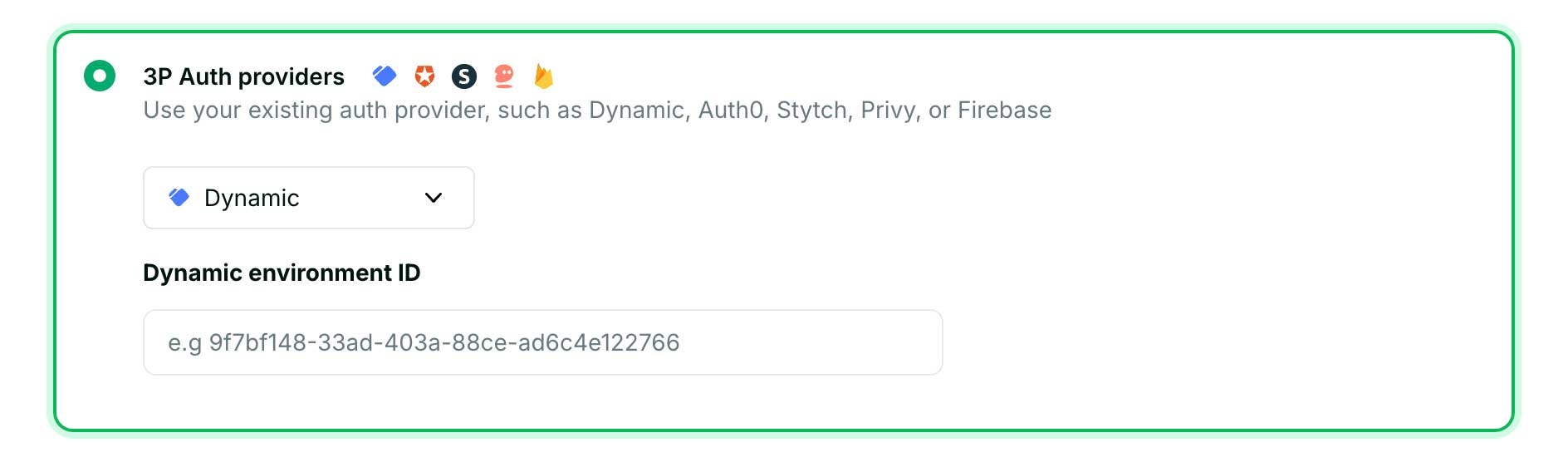
    5. Within the JWT authentication section, select "3P Auth providers" option, and then select Dynamic
    6. Add your Environment ID and save changes
    <Frame>
      <img src="https://mintcdn.com/dynamic-docs/DXbjtpFZjzIwv2VQ/images/crossmint/crossmint-3.jpg?fit=max&auto=format&n=DXbjtpFZjzIwv2VQ&q=85&s=e3aa49a2b3528fc0e655ea76e4e571da" alt="Dynamic Dashboard" width="1888" height="556" data-path="images/crossmint/crossmint-3.jpg" />
    </Frame>
  </Step>

  <Step title="Configure Chain Support in Dynamic">
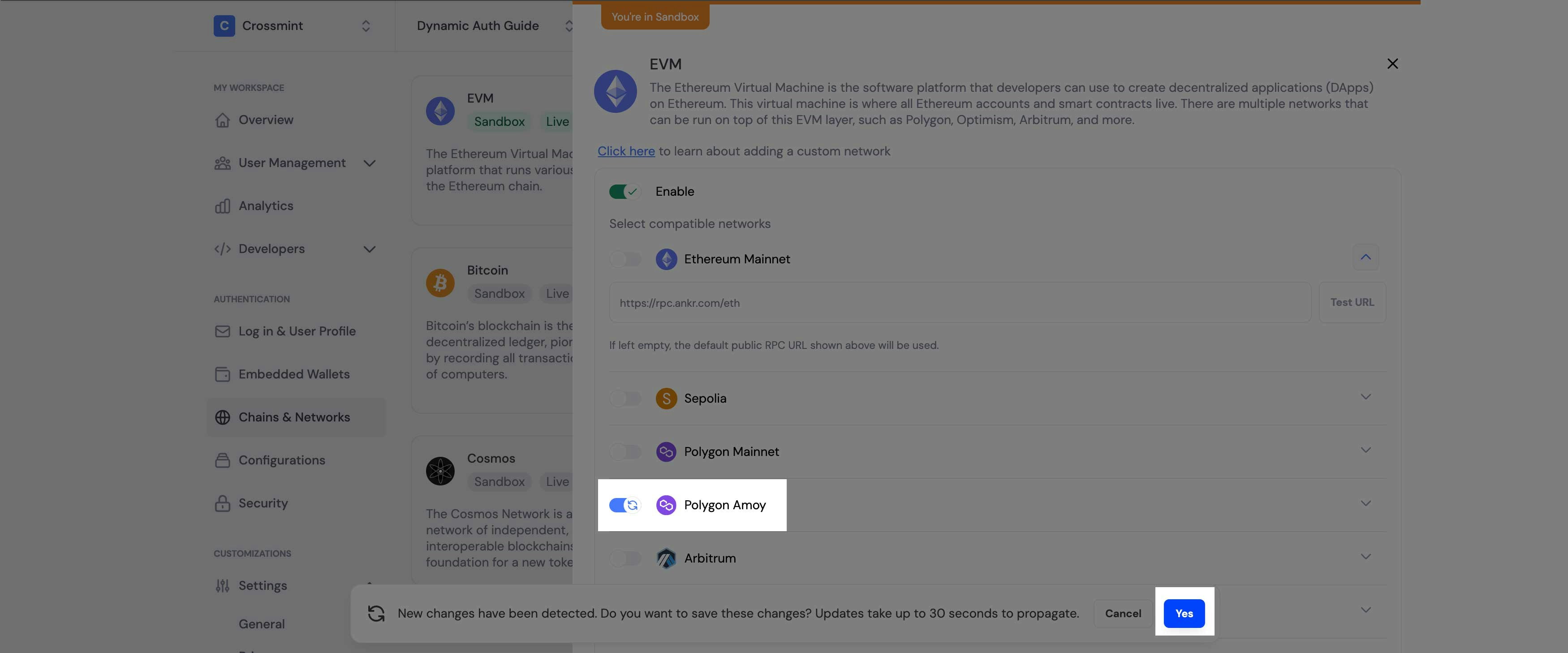
    To integrate Crossmint Smart Wallets with Dynamic as the auth provider, you need to configure the chain you want to use:

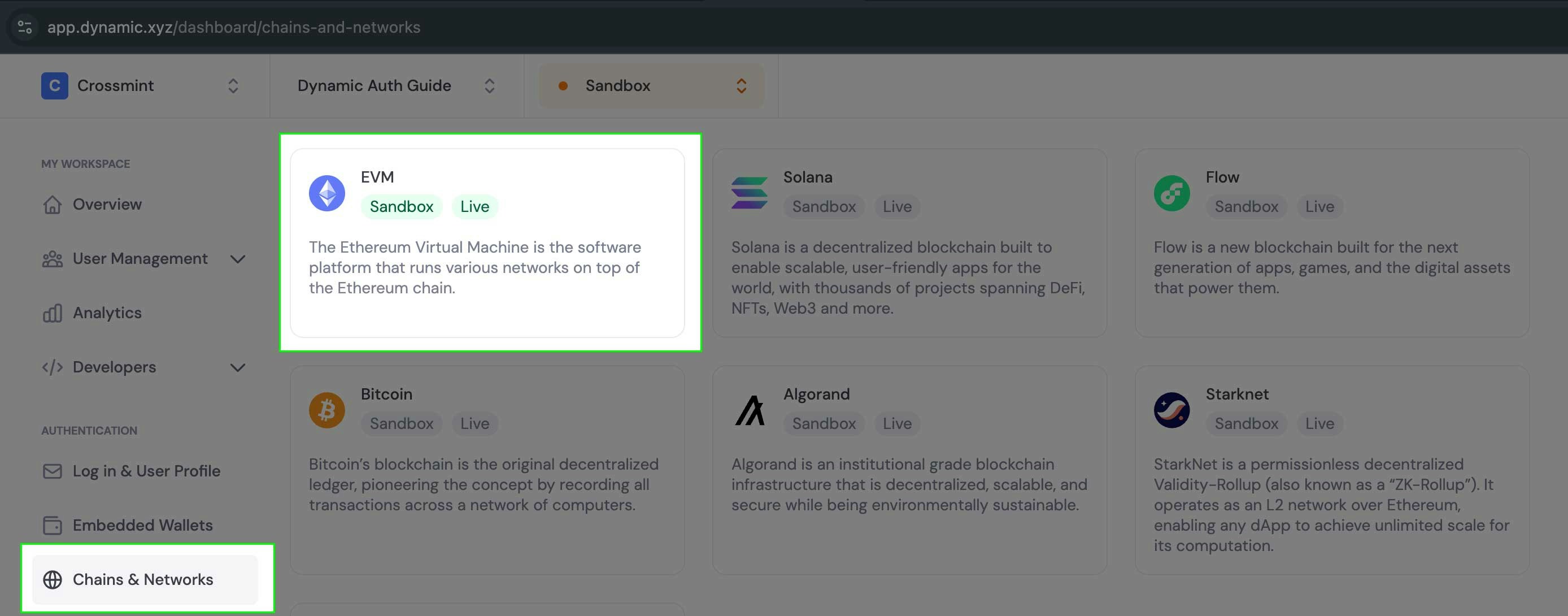
    1. With the same project selected, select the "Chains and Networks" option in the left-hand navigation
    2. Click the EVM option to reveal a drawer where you can toggle chain support on and off

    <Frame>
      <img src="https://mintcdn.com/dynamic-docs/DXbjtpFZjzIwv2VQ/images/crossmint/crossmint-4.jpg?fit=max&auto=format&n=DXbjtpFZjzIwv2VQ&q=85&s=362aa08fafe5562a528ae5a1982569ad" alt="Dynamic Dashboard" width="2776" height="1090" data-path="images/crossmint/crossmint-4.jpg" />
    </Frame>

    3. Enable the desired chain for smart wallet support (in this example, we'll use `polygon-amoy`)
    <Frame>
      <img src="https://mintcdn.com/dynamic-docs/DXbjtpFZjzIwv2VQ/images/crossmint/crossmint-5.jpg?fit=max&auto=format&n=DXbjtpFZjzIwv2VQ&q=85&s=7be137737d3074c904562c3d51685399" alt="Dynamic Dashboard" width="3500" height="1458" data-path="images/crossmint/crossmint-5.jpg" />
    </Frame>
  </Step>

  <Step title="Install Required Dependencies">
    Install the Crossmint React UI SDK and Dynamic packages:

    ```bash theme={"system"}
    npm install @crossmint/client-sdk-react-ui @dynamic-labs/sdk-react-core @dynamic-labs/ethereum
    ```

    Then, set up shadcn UI components:

    ```bash theme={"system"}
    npx shadcn-ui@latest init -d
    ```

    Install the button and card components:

    ```bash theme={"system"}
    npx shadcn-ui@latest add button card
    ```
  </Step>

  <Step title="Configure Environment Variables">
    Add your Crossmint client-side API key and Dynamic Environment ID to your environment file:

    ```shell theme={"system"}
    NEXT_PUBLIC_DYNAMIC_ENV_ID=_YOUR_DYNAMIC_ENV_ID_
    NEXT_PUBLIC_CROSSMINT_DYNAMIC_API_KEY=_YOUR_CROSSMINT_API_KEY_
    ```
  </Step>

  <Step title="Create the Provider Components">
    First, create a CrossmintDynamicProvider component that will wrap your application:

    ```tsx components/providers/CrossmintDynamicProvider.tsx theme={"system"}
    'use client';

    import {
      CrossmintProvider,
      CrossmintWalletProvider,
    } from '@crossmint/client-sdk-react-ui';
    import { DynamicContextProvider } from '@dynamic-labs/sdk-react-core';
    import { EthereumWalletConnectors } from '@dynamic-labs/ethereum';

    const dynamicEnvId = process.env.NEXT_PUBLIC_DYNAMIC_ENV_ID ?? '';
    const crossmintApiKey = process.env.NEXT_PUBLIC_CROSSMINT_DYNAMIC_API_KEY ?? '';

    if (!dynamicEnvId || !crossmintApiKey) {
      throw new Error(
        'NEXT_PUBLIC_DYNAMIC_ENV_ID or NEXT_PUBLIC_CROSSMINT_DYNAMIC_API_KEY is not set'
      );
    }

    export default function CrossmintDynamicProvider({
      children,
    }: {
      children: React.ReactNode;
    }) {
      return (
        <DynamicContextProvider
          settings={{
            environmentId: dynamicEnvId,
            walletConnectors: [EthereumWalletConnectors],
          }}>
          <CrossmintProvider apiKey={crossmintApiKey}>
            <CrossmintWalletProvider defaultChain="polygon-amoy">
              {children}
            </CrossmintWalletProvider>
          </CrossmintProvider>
        </DynamicContextProvider>
      );
    }
    ```

    Now create a custom hook that connects Dynamic with Crossmint:

    ```tsx hooks/useDynamicConnector.tsx theme={"system"}
    'use client';

    import {
      useCrossmint,
      useWallet as useCrossmintSmartWallet,
    } from '@crossmint/client-sdk-react-ui';
    import { isEthereumWallet } from '@dynamic-labs/ethereum';
    import {
      getAuthToken,
      useDynamicContext,
      useIsLoggedIn,
    } from '@dynamic-labs/sdk-react-core';
    import { useEffect, useState } from 'react';

    export function useDynamicConnector() {
      const { setJwt } = useCrossmint();
      const { primaryWallet: dynamicPrimaryWallet, sdkHasLoaded } =
        useDynamicContext();
      const isDynamicUserLoggedIn = useIsLoggedIn();
      const {
        getOrCreateWallet: getOrCreateCrossmintSmartWallet,
        status: crossmintSmartWalletStatus,
        error: crossmintSmartWalletError,
        wallet: crossmintWallet,
      } = useCrossmintSmartWallet();

      // State to track loading status
      const [isLoading, setIsLoading] = useState(true);

      // Step 1: Sync Dynamic JWT with Crossmint
      useEffect(() => {
        const syncDynamicJwt = async () => {
          try {
            const dynamicJwt = getAuthToken();
            setJwt(dynamicJwt ?? undefined);
          } catch (error) {
            setJwt(undefined);
            console.error('Failed to get Dynamic JWT:', error);
          }
        };

        if (isDynamicUserLoggedIn) {
          syncDynamicJwt();
        }
      }, [isDynamicUserLoggedIn, setJwt]);

      // Step 2: Get Dynamic wallet and create Crossmint wallet
      useEffect(() => {
        const createWalletWithDynamicSigner = async () => {
          setIsLoading(true);

          if (!dynamicPrimaryWallet || !isDynamicUserLoggedIn || !sdkHasLoaded) {
            setIsLoading(false);
            return;
          }

          try {

            if (!isEthereumWallet(dynamicPrimaryWallet)) {
              setIsLoading(false);
              return;
            }

            // Get the wallet client from Dynamic
            const dynamicWalletClient = await dynamicPrimaryWallet.getWalletClient();

            // Create a Crossmint Smart Wallet using the Dynamic wallet as signer
            await getOrCreateCrossmintSmartWallet({
              type: 'evm-smart-wallet',
              signer: dynamicWalletClient,
            });
          } catch (error) {
            console.error('Failed to create Crossmint wallet:', error);
          } finally {
            setIsLoading(false);
          }
        };

        createWalletWithDynamicSigner();
      }, [dynamicPrimaryWallet, isDynamicUserLoggedIn, sdkHasLoaded, getOrCreateCrossmintSmartWallet]);

      return {
        dynamicWallet: dynamicPrimaryWallet,
        crossmintWallet,
        crossmintSmartWalletStatus,
        crossmintSmartWalletError,
        isLoading: isLoading || crossmintSmartWalletStatus === 'in-progress' || !sdkHasLoaded,
      };
    }
    ```
  </Step>

  <Step title="Update Your Layout">
    Update your app's layout to use the CrossmintDynamicProvider:

    ```tsx app/layout.tsx theme={"system"}
    import type { Metadata } from 'next';
    import { Inter } from 'next/font/google';
    import './globals.css';
    import CrossmintDynamicProvider from '@/components/providers/CrossmintDynamicProvider';

    const inter = Inter({ subsets: ['latin'] });

    export const metadata: Metadata = {
      title: 'Crossmint + Dynamic Integration',
      description: 'Example of using Crossmint with Dynamic Auth',
    };

    export default function RootLayout({
      children,
    }: Readonly<{
      children: React.ReactNode;
    }>) {
      return (
        <html lang="en">
          <body className={inter.className}>
            <CrossmintDynamicProvider>
              <main className="flex min-h-screen flex-col items-center justify-between p-24">
                {children}
              </main>
            </CrossmintDynamicProvider>
          </body>
        </html>
      );
    }
    ```
  </Step>

  <Step title="Create UI Components">
    Create a component that uses the Dynamic connector and displays wallet information:

    ```tsx components/WalletCard.tsx theme={"system"}
    'use client';

    import { DynamicWidget } from '@dynamic-labs/sdk-react-core';
    import { Card, CardContent } from '@/components/ui/card';
    import { useDynamicConnector } from '@/hooks/useDynamicConnector';

    export function WalletCard() {
      const {
        dynamicWallet,
        crossmintWallet,
        crossmintSmartWalletStatus,
        crossmintSmartWalletError,
        isLoading,
      } = useDynamicConnector();

      return (
        <Card className="w-full max-w-lg">
          <CardContent className="space-y-4 pt-6">
            <DynamicWidget />

            <div className="space-y-2 pt-4">
              <div className="text-sm text-muted-foreground">
                <strong>Crossmint Smart Wallet:</strong>{' '}
                {crossmintWallet?.address || 'Not connected'}
              </div>
              <div className="text-sm text-muted-foreground">
                <strong>Dynamic Signer Wallet:</strong>{' '}
                {dynamicWallet?.address || 'Not connected'}
              </div>
              <div className="text-sm text-muted-foreground">
                <strong>Status:</strong>{' '}
                {isLoading ? 'Loading...' : crossmintSmartWalletStatus}
              </div>

              {crossmintSmartWalletError && (
                <div className="text-sm text-red-500">
                  <strong>Error:</strong> {crossmintSmartWalletError?.message}
                </div>
              )}
            </div>
          </CardContent>
        </Card>
      );
    }
    ```
  </Step>

  <Step title="Create Your Main Page">
    Create your main page that uses the WalletCard component:

    ```tsx app/page.tsx theme={"system"}
    import { WalletCard } from '@/components/WalletCard';

    export default function Home() {
      return (
        <div className="flex flex-col items-center gap-8">
          <h1 className="text-3xl font-bold">Crossmint + Dynamic Integration</h1>
          <p className="text-center max-w-2xl text-muted-foreground">
            This example demonstrates how to use Dynamic's wallet as a signer for Crossmint Smart Wallets.
            When you connect with Dynamic, your wallet serves as the signer for your Crossmint Smart Wallet.
          </p>
          <WalletCard />
        </div>
      );
    }
    ```
  </Step>

  <Step title="Launch and Test">
    1. Start your development server:

    ```bash theme={"system"}
    npm run dev
    ```

    2. Visit [http://localhost:3000](http://localhost:3000) in your browser
    3. Click the Dynamic widget to start the authentication flow
    4. Follow the prompts to authenticate using Dynamic
    5. Once logged in, you should see both your Dynamic wallet address and your Crossmint Smart Wallet address
  </Step>
</Steps>

## How It Works

```mermaid theme={"system"}
sequenceDiagram
    participant User
    participant App
    participant Dynamic
    participant Crossmint

    User->>App: Log in
    App->>Dynamic: Authenticate user
    Dynamic->>App: Create embedded wallet & return JWT
    App->>Crossmint: Connect with Dynamic JWT
    App->>Crossmint: Create Crossmint smart wallet using Dynamic wallet as signer
    Crossmint->>App: Return Crossmint smart wallet
    Note over App: User now has:
    Note over App: 1. Dynamic embedded wallet (signer)
    Note over App: 2. Crossmint smart wallet
```

The integration between Dynamic and Crossmint involves these key components:

1. **Authentication Flow**:
   * User connects wallet using Dynamic's authentication
   * Dynamic provides the wallet and authentication token (JWT)
   * The Crossmint SDK uses the JWT from Dynamic to authenticate with Crossmint
2. **Wallet Creation**:
   * The `useDynamicConnector` hook retrieves the primary wallet from Dynamic
   * It gets the wallet client from the Dynamic wallet to use as a signer
   * It creates a Crossmint Smart Wallet using the Dynamic wallet as the signer
3. **Key Benefits**:
   * Users leverage their existing Dynamic authentication
   * No new key management required
   * The Dynamic wallet serves as a signer for the Crossmint Smart Wallet
   * Cross-chain support through Crossmint's infrastructure

<AccordionGroup>
  <Accordion title="Understanding Wallet Relationships">
    * **Dynamic Wallet**: The primary signer that controls the Crossmint Smart Wallet
    * **Crossmint Smart Wallet**: A fully-featured EVM wallet with gas sponsorship capabilities
    * The user authenticates with Dynamic, but gains access to Crossmint's advanced wallet infrastructure
  </Accordion>

  <Accordion title="Handling JWT Authentication">
    The integration relies on JWT tokens for secure authentication:

    1. Dynamic issues a JWT token upon user authentication
    2. The Crossmint SDK uses this JWT to authenticate the user with Crossmint
    3. The JWT handling is abstracted away in the `useCrossmint` hook
    4. Tokens are automatically refreshed as needed
  </Accordion>

  <Accordion title="Troubleshooting Common Issues">
    **Module not found: Can't resolve `rpc-websockets/dist/lib/client`**

    Add this to your `package.json`:

    ```json theme={"system"}
    "resolutions": {
      "rpc-websockets": "7.11.0"
    }
    ```

    **Chain mismatch errors between Dynamic and Wagmi**

    Ensure your Dynamic environment is configured for the same chain you're using in your app. Check the Dynamic.xyz dashboard and make sure the chain is enabled.
  </Accordion>
</AccordionGroup>