> ## Documentation Index
> Fetch the complete documentation index at: https://docs.dynamic.xyz/docs/llms.txt
> Use this file to discover all available pages before exploring further.
# Creating Wallets
For new React apps, we recommend the JavaScript SDK with React Hooks (`@dynamic-labs-sdk/react-hooks`) instead of the legacy React SDK documented here. The JS SDK comes with many benefits such as a much smaller bundle size and other optimizations. Use the [React quickstart (JavaScript SDK)](/javascript/reference/react-quickstart) to get started.
No matter how your user signs up, whether it's through social login such as Telegram, email or phone, or a branded wallet like MetaMask, you can create an embedded wallet for them using Dynamic. Simply choose when you want the wallet to be created and follow the guides below.
Please make sure you are on v4.20.6 before continuing.
## During Signup (Automatic)
### Creating Embedded Wallets
By default, embedded wallets are created automatically for users during sign-up if they don't already have a wallet on the enabled chain. All you have to do is check that the "Create on Sign up" toggle is turned on in [the Embedded Wallet configuration page](https://app.dynamic.xyz/dashboard/embedded-wallets/dynamic).
 Automatic embedded wallet creation only creates a single wallet for a user on each chain you have selected. For information on how to create multiple wallets, see the "Creating Wallets Any Time" section below.
### Creating Wallets for users with External Wallets
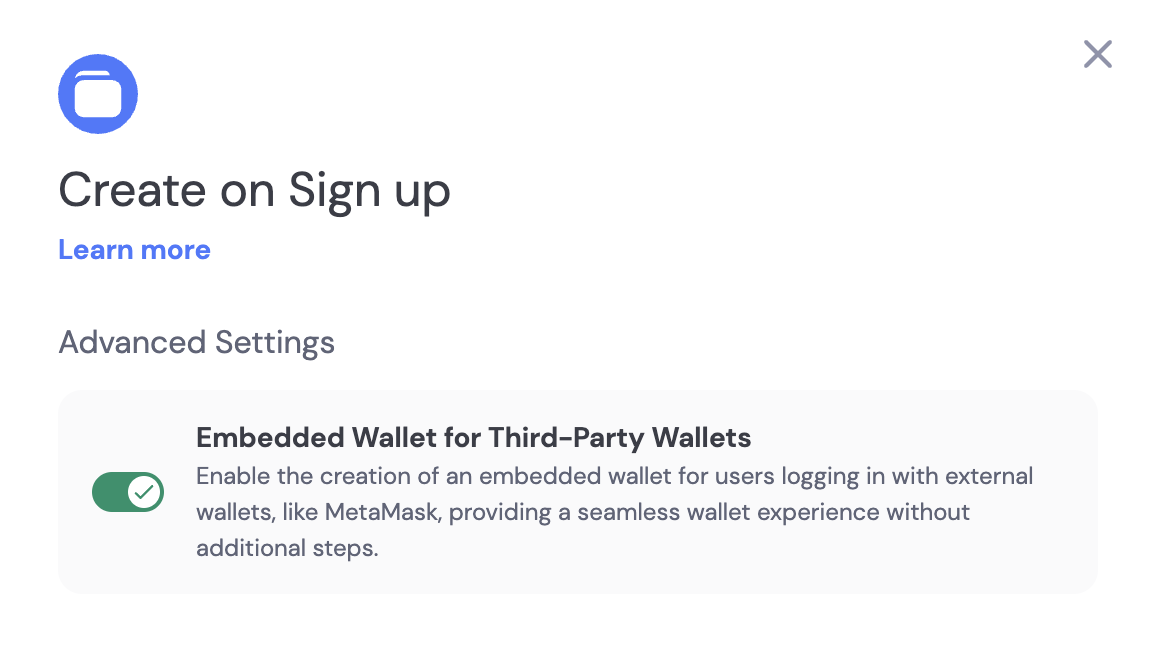
You can automatically create embedded wallets for users who sign in with external wallets like MetaMask. To enable this feature, open the “Create on Sign Up” card, expand the “Advanced Options” panel, and turn on the “Embedded Wallet for Third-Party Wallets” toggle.
Automatic embedded wallet creation only creates a single wallet for a user on each chain you have selected. For information on how to create multiple wallets, see the "Creating Wallets Any Time" section below.
### Creating Wallets for users with External Wallets
You can automatically create embedded wallets for users who sign in with external wallets like MetaMask. To enable this feature, open the “Create on Sign Up” card, expand the “Advanced Options” panel, and turn on the “Embedded Wallet for Third-Party Wallets” toggle.
 ## Custom Logic (Manual)
### Check if User has an Embedded Wallet
You can check if a user has an embedded wallet by using the `useDynamicWaas` hook.
```javascript theme={"system"}
const { userHasEmbeddedWallet } = useDynamicWaas();
if (userHasEmbeddedWallet) {
console.log('User has an embedded wallet');
}
```
### Creating Wallets Any Time
If you do not want to create wallets for users automatically when they sign up, you can create wallets for users using custom logic.
To do so, call the `createWalletAccount` method from the `useDynamicWaas` hook when you want to create a wallet for a user.
You can control which chains you create wallets on by passing an array of chains to the `createWalletAccount` method. See the [useDynamicWaas](/react/reference/hooks/embedded-wallets/usedynamicwaas) documentation for more details.
```javascript theme={"system"}
import { useDynamicWaas, useUserWallets } from "@dynamic-labs/sdk-react-core";
import { ChainEnum } from "@dynamic-labs/sdk-api-core";
// component declaration and all other logic you might need
const { createWalletAccount, getWaasWallets } = useDynamicWaas();
const onCreateWalletHandler = async () => {
try {
const waasWallets = await getWaasWallets();
if (waasWallets.length === 0) {
await createWalletAccount([ChainEnum.Evm, ChainEnum.Sol]);
}
} catch (e) {
console.error(e);
}
};
```
### Creating Bitcoin Wallets
Bitcoin wallets require a `bitcoinConfig` so the SDK knows which address type to derive. Pick `native_segwit` (`bc1q…`, lower fees) or `taproot` (`bc1p…`, Schnorr signatures).
The recommended way is the structured `WalletCreationRequirement[]` format, which lets BTC carry its config alongside other chains in the same call:
```javascript theme={"system"}
import { useDynamicWaas } from "@dynamic-labs/sdk-react-core";
import { ChainEnum } from "@dynamic-labs/sdk-api-core";
const { createWalletAccount } = useDynamicWaas();
await createWalletAccount([
{ chain: ChainEnum.Evm },
{
chain: ChainEnum.Btc,
bitcoinConfig: {
addressType: 'native_segwit', // or 'taproot'
network: 'mainnet',
},
},
]);
```
`createWalletAccount` also accepts `bitcoinConfig` as a third positional argument for backward compatibility — it will be applied to any `Btc` entry in the chain array:
```javascript theme={"system"}
await createWalletAccount(
[ChainEnum.Btc],
undefined, // password
{ addressType: 'native_segwit', network: 'mainnet' },
);
```
Bitcoin mainnet is the only network supported today.
## Creating Wallets with a Password
You can create MPC wallets that are protected with a password for additional security. When a wallet is created with a password, certain operations (like signing transactions or exporting keys) will require the password to be provided. For more details, see [Password encryption](/react/wallets/embedded-wallets/mpc/password-encryption).
```javascript theme={"system"}
import { useDynamicWaas } from "@dynamic-labs/sdk-react-core";
import { ChainEnum } from "@dynamic-labs/sdk-api-core";
const { createWalletAccount } = useDynamicWaas();
const onCreateSecureWalletHandler = async (password: string) => {
try {
const secureWallet = await createWalletAccount(
[ChainEnum.Evm],
password
);
console.log('Secure wallet created:', secureWallet);
} catch (e) {
console.error('Error creating secure wallet:', e);
}
};
```
### Password options
There are two approaches to providing the password:
| Approach | Description | Best for |
| --------------------- | ---------------------------------------------------- | ------------------------------------------------ |
| **User-provided** | User chooses and remembers their own password | Users who want full control over wallet security |
| **Developer-managed** | You generate and store the passwords on your backend | Seamless UX without password prompts |
#### Why use developer-managed passwords?
* **Seamless device migration**: Users can lose their device and seamlessly migrate to a new one without needing to remember any password.
* **Better user experience**: No password prompts or recovery flows for users to manage.
* **Reduced trust in any single party**: No single party (Dynamic, encryption provider, or you) can access the wallet alone—all three would need to collude, eliminating single points of trust.
#### Important considerations
* **User-provided passwords**: Ensure users understand the importance of backing up their passwords. If lost, wallet recovery may not be possible.
* **Developer-managed passwords**: Store passwords securely on your backend with proper encryption. You are responsible for password security and availability. Use unique passwords for each user—do not reuse passwords across different users.
## Managing Password-Protected Wallets
Once you have created a password-protected wallet, you can manage it using the methods available in the `useDynamicWaas` hook.
### Unlocking a Password-Protected Wallet
Before performing operations with a password-protected wallet, you need to unlock it.
```javascript theme={"system"}
import { useDynamicWaas } from "@dynamic-labs/sdk-react-core";
const { unlockWallet } = useDynamicWaas();
const onUnlockWalletHandler = async (walletId: string, password: string) => {
try {
await unlockWallet(walletId, password);
console.log('Wallet unlocked successfully');
} catch (e) {
console.error('Error unlocking wallet:', e);
}
};
```
### Updating Wallet Password
You can update the password for a password-protected wallet.
```javascript theme={"system"}
import { useDynamicWaas } from "@dynamic-labs/sdk-react-core";
const { updatePassword } = useDynamicWaas();
const onUpdatePasswordHandler = async (
walletId: string,
currentPassword: string,
newPassword: string
) => {
try {
await updatePassword(walletId, currentPassword, newPassword);
console.log('Password updated successfully');
} catch (e) {
console.error('Error updating password:', e);
}
};
```
### Checking Wallet Recovery State
You can retrieve the recovery state information for a wallet account.
```javascript theme={"system"}
import { useDynamicWaas } from "@dynamic-labs/sdk-react-core";
const { getWalletRecoveryState } = useDynamicWaas();
const onCheckRecoveryStateHandler = async (walletId: string) => {
try {
const recoveryState = await getWalletRecoveryState(walletId);
console.log('Recovery state:', recoveryState);
} catch (e) {
console.error('Error checking recovery state:', e);
}
};
```
## Custom Logic (Manual)
### Check if User has an Embedded Wallet
You can check if a user has an embedded wallet by using the `useDynamicWaas` hook.
```javascript theme={"system"}
const { userHasEmbeddedWallet } = useDynamicWaas();
if (userHasEmbeddedWallet) {
console.log('User has an embedded wallet');
}
```
### Creating Wallets Any Time
If you do not want to create wallets for users automatically when they sign up, you can create wallets for users using custom logic.
To do so, call the `createWalletAccount` method from the `useDynamicWaas` hook when you want to create a wallet for a user.
You can control which chains you create wallets on by passing an array of chains to the `createWalletAccount` method. See the [useDynamicWaas](/react/reference/hooks/embedded-wallets/usedynamicwaas) documentation for more details.
```javascript theme={"system"}
import { useDynamicWaas, useUserWallets } from "@dynamic-labs/sdk-react-core";
import { ChainEnum } from "@dynamic-labs/sdk-api-core";
// component declaration and all other logic you might need
const { createWalletAccount, getWaasWallets } = useDynamicWaas();
const onCreateWalletHandler = async () => {
try {
const waasWallets = await getWaasWallets();
if (waasWallets.length === 0) {
await createWalletAccount([ChainEnum.Evm, ChainEnum.Sol]);
}
} catch (e) {
console.error(e);
}
};
```
### Creating Bitcoin Wallets
Bitcoin wallets require a `bitcoinConfig` so the SDK knows which address type to derive. Pick `native_segwit` (`bc1q…`, lower fees) or `taproot` (`bc1p…`, Schnorr signatures).
The recommended way is the structured `WalletCreationRequirement[]` format, which lets BTC carry its config alongside other chains in the same call:
```javascript theme={"system"}
import { useDynamicWaas } from "@dynamic-labs/sdk-react-core";
import { ChainEnum } from "@dynamic-labs/sdk-api-core";
const { createWalletAccount } = useDynamicWaas();
await createWalletAccount([
{ chain: ChainEnum.Evm },
{
chain: ChainEnum.Btc,
bitcoinConfig: {
addressType: 'native_segwit', // or 'taproot'
network: 'mainnet',
},
},
]);
```
`createWalletAccount` also accepts `bitcoinConfig` as a third positional argument for backward compatibility — it will be applied to any `Btc` entry in the chain array:
```javascript theme={"system"}
await createWalletAccount(
[ChainEnum.Btc],
undefined, // password
{ addressType: 'native_segwit', network: 'mainnet' },
);
```
Bitcoin mainnet is the only network supported today.
## Creating Wallets with a Password
You can create MPC wallets that are protected with a password for additional security. When a wallet is created with a password, certain operations (like signing transactions or exporting keys) will require the password to be provided. For more details, see [Password encryption](/react/wallets/embedded-wallets/mpc/password-encryption).
```javascript theme={"system"}
import { useDynamicWaas } from "@dynamic-labs/sdk-react-core";
import { ChainEnum } from "@dynamic-labs/sdk-api-core";
const { createWalletAccount } = useDynamicWaas();
const onCreateSecureWalletHandler = async (password: string) => {
try {
const secureWallet = await createWalletAccount(
[ChainEnum.Evm],
password
);
console.log('Secure wallet created:', secureWallet);
} catch (e) {
console.error('Error creating secure wallet:', e);
}
};
```
### Password options
There are two approaches to providing the password:
| Approach | Description | Best for |
| --------------------- | ---------------------------------------------------- | ------------------------------------------------ |
| **User-provided** | User chooses and remembers their own password | Users who want full control over wallet security |
| **Developer-managed** | You generate and store the passwords on your backend | Seamless UX without password prompts |
#### Why use developer-managed passwords?
* **Seamless device migration**: Users can lose their device and seamlessly migrate to a new one without needing to remember any password.
* **Better user experience**: No password prompts or recovery flows for users to manage.
* **Reduced trust in any single party**: No single party (Dynamic, encryption provider, or you) can access the wallet alone—all three would need to collude, eliminating single points of trust.
#### Important considerations
* **User-provided passwords**: Ensure users understand the importance of backing up their passwords. If lost, wallet recovery may not be possible.
* **Developer-managed passwords**: Store passwords securely on your backend with proper encryption. You are responsible for password security and availability. Use unique passwords for each user—do not reuse passwords across different users.
## Managing Password-Protected Wallets
Once you have created a password-protected wallet, you can manage it using the methods available in the `useDynamicWaas` hook.
### Unlocking a Password-Protected Wallet
Before performing operations with a password-protected wallet, you need to unlock it.
```javascript theme={"system"}
import { useDynamicWaas } from "@dynamic-labs/sdk-react-core";
const { unlockWallet } = useDynamicWaas();
const onUnlockWalletHandler = async (walletId: string, password: string) => {
try {
await unlockWallet(walletId, password);
console.log('Wallet unlocked successfully');
} catch (e) {
console.error('Error unlocking wallet:', e);
}
};
```
### Updating Wallet Password
You can update the password for a password-protected wallet.
```javascript theme={"system"}
import { useDynamicWaas } from "@dynamic-labs/sdk-react-core";
const { updatePassword } = useDynamicWaas();
const onUpdatePasswordHandler = async (
walletId: string,
currentPassword: string,
newPassword: string
) => {
try {
await updatePassword(walletId, currentPassword, newPassword);
console.log('Password updated successfully');
} catch (e) {
console.error('Error updating password:', e);
}
};
```
### Checking Wallet Recovery State
You can retrieve the recovery state information for a wallet account.
```javascript theme={"system"}
import { useDynamicWaas } from "@dynamic-labs/sdk-react-core";
const { getWalletRecoveryState } = useDynamicWaas();
const onCheckRecoveryStateHandler = async (walletId: string) => {
try {
const recoveryState = await getWalletRecoveryState(walletId);
console.log('Recovery state:', recoveryState);
} catch (e) {
console.error('Error checking recovery state:', e);
}
};
```