> ## Documentation Index
> Fetch the complete documentation index at: https://docs.dynamic.xyz/docs/llms.txt
> Use this file to discover all available pages before exploring further.
# Setup Embedded Wallets
For new React apps, we recommend the JavaScript SDK with React Hooks (`@dynamic-labs-sdk/react-hooks`) instead of the legacy React SDK documented here. The JS SDK comes with many benefits such as a much smaller bundle size and other optimizations. Use the [React quickstart (JavaScript SDK)](/javascript/reference/react-quickstart) to get started.
If you are a current user of our legacy embedded wallets, you can find the migration guide [here](/react/wallets/embedded-wallets/mpc/upgrade-guide) and any legacy documentation [here](/react/wallets/embedded-wallets/legacy) (only creating and reveal/unlinking are different).
## General Setup
### Enable in Dashboard
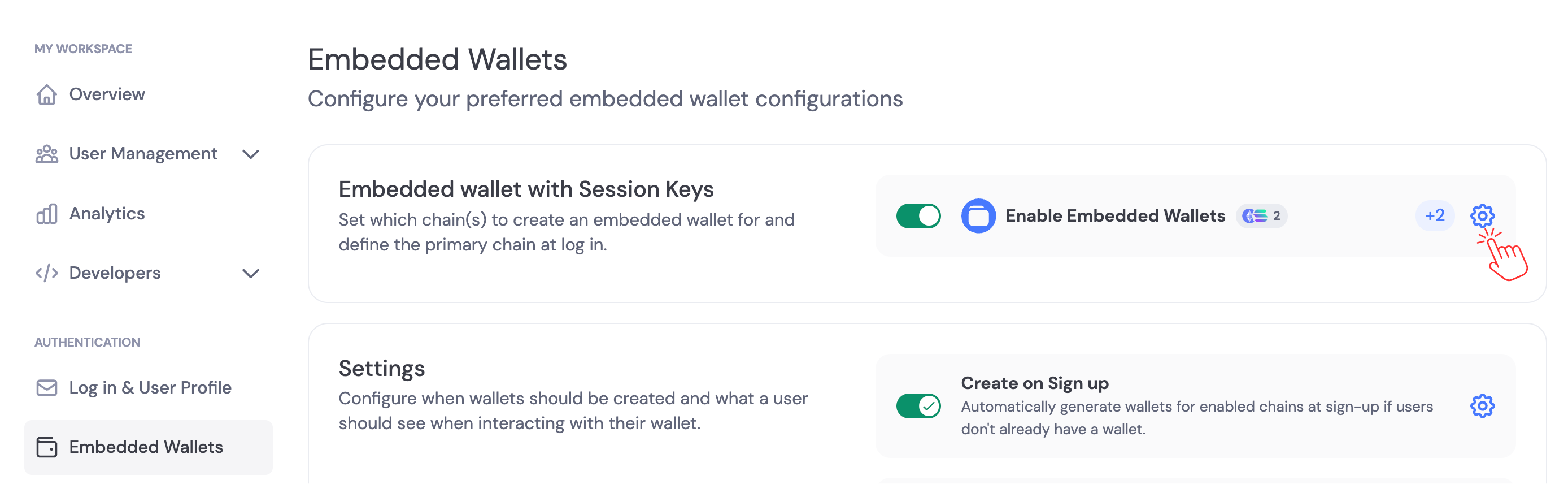
Navigate to the [Dynamic Dashboard > Embedded Wallets](https://app.dynamic.xyz/dashboard/embedded-wallets/dynamic) and enable Embedded Wallets, then click settings and choose the chains you'd like wallets created on.
 ### Private Key Export Settings
By default, users can export their private keys from embedded wallets. You can disable private key exports in the [Embedded Wallets settings](https://app.dynamic.xyz/dashboard/embedded-wallets/dynamic). Navigate to the **Security** section and toggle **Private Key Exports** to control whether users can export their private keys.
### Private Key Export Settings
By default, users can export their private keys from embedded wallets. You can disable private key exports in the [Embedded Wallets settings](https://app.dynamic.xyz/dashboard/embedded-wallets/dynamic). Navigate to the **Security** section and toggle **Private Key Exports** to control whether users can export their private keys.
 Consider disabling private key exports if your use case requires additional security controls. Disabling exports prevents users from exporting keys, which can reduce the risk of key exposure but limits user portability. See [Best Practices - Private Key Export Controls](/overview/security/recommendedpaths#private-key-export-controls) for guidance.
## Using your UI
Only supported on React SDK v4.20.0 and later versions
Reference example: [https://github.com/dynamic-labs/examples/tree/main/examples/nextjs-mpc-demo](https://github.com/dynamic-labs/examples/tree/main/examples/nextjs-mpc-demo)
Note: You only need to install the connectors for the chains you want to support.
```bash theme={"system"}
npm i @dynamic-labs/sdk-react-core
npm i @dynamic-labs/ethereum
npm i @dynamic-labs/solana
npm i @dynamic-labs/stellar
npm i @dynamic-labs/sui
```
You must whitelist the dynamic auth URL for the iframe connection to work. Here's how:
```js theme={"system"}
res.setHeader("Content-Security-Policy", "frame-src https://app.dynamicauth.com 'self';");
```
> ⚠️ If you're already setting CSP, append [https://app.dynamicauth.com](https://app.dynamicauth.com) to the existing frame-src list rather than replacing it.
***
```html theme={"system"}
```
```
add_header Content-Security-Policy "frame-src https://app.dynamicauth.com 'self';";
```
```json vercel.json theme={"system"}
{
"headers": [
{
"source": "/(.*)",
"headers": [
{
"key": "Content-Security-Policy",
"value": "frame-src https://app.dynamicauth.com 'self';"
}
]
}
]
}
```
```txt _headers theme={"system"}
Content-Security-Policy: frame-src https://app.dynamicauth.com 'self';
```
Include the appropriate connectors inside your provider settings:
```jsx theme={"system"}
import { EthereumWalletConnectors } from '@dynamic-labs/ethereum';
import { SolanaWalletConnectors } from '@dynamic-labs/solana';
import { StellarWalletConnectors } from '@dynamic-labs/stellar';
import { SuiWalletConnectors } from '@dynamic-labs/sui';
const connectors = [
EthereumWalletConnectors,
SolanaWalletConnectors,
StellarWalletConnectors,
SuiWalletConnectors,
];
return (
{/* Your app components */}
);
```
Once enabled, you can choose whether wallets are created automatically on signup/sign-in, or created manually in your app logic. See [Creating Embedded Wallets](/react/wallets/embedded-wallets/mpc/creating-wallets).
### Next steps
* Create embedded wallets automatically or manually: [Creating Embedded Wallets](/react/wallets/embedded-wallets/mpc/creating-wallets)
* Configure signing/confirmation experience: [Embedded Wallet Signing Configuration](/react/wallets/embedded-wallets/mpc/transactions)
* Password protection: [Password encryption](/react/wallets/embedded-wallets/mpc/password-encryption)
* Import/export keys: [Importing & Exporting Embedded Wallets](/react/wallets/embedded-wallets/mpc/import-export)
* Advanced signing scenarios: [Raw Signing (EVM)](/react/wallets/using-wallets/evm/raw-signing)
Consider disabling private key exports if your use case requires additional security controls. Disabling exports prevents users from exporting keys, which can reduce the risk of key exposure but limits user portability. See [Best Practices - Private Key Export Controls](/overview/security/recommendedpaths#private-key-export-controls) for guidance.
## Using your UI
Only supported on React SDK v4.20.0 and later versions
Reference example: [https://github.com/dynamic-labs/examples/tree/main/examples/nextjs-mpc-demo](https://github.com/dynamic-labs/examples/tree/main/examples/nextjs-mpc-demo)
Note: You only need to install the connectors for the chains you want to support.
```bash theme={"system"}
npm i @dynamic-labs/sdk-react-core
npm i @dynamic-labs/ethereum
npm i @dynamic-labs/solana
npm i @dynamic-labs/stellar
npm i @dynamic-labs/sui
```
You must whitelist the dynamic auth URL for the iframe connection to work. Here's how:
```js theme={"system"}
res.setHeader("Content-Security-Policy", "frame-src https://app.dynamicauth.com 'self';");
```
> ⚠️ If you're already setting CSP, append [https://app.dynamicauth.com](https://app.dynamicauth.com) to the existing frame-src list rather than replacing it.
***
```html theme={"system"}
```
```
add_header Content-Security-Policy "frame-src https://app.dynamicauth.com 'self';";
```
```json vercel.json theme={"system"}
{
"headers": [
{
"source": "/(.*)",
"headers": [
{
"key": "Content-Security-Policy",
"value": "frame-src https://app.dynamicauth.com 'self';"
}
]
}
]
}
```
```txt _headers theme={"system"}
Content-Security-Policy: frame-src https://app.dynamicauth.com 'self';
```
Include the appropriate connectors inside your provider settings:
```jsx theme={"system"}
import { EthereumWalletConnectors } from '@dynamic-labs/ethereum';
import { SolanaWalletConnectors } from '@dynamic-labs/solana';
import { StellarWalletConnectors } from '@dynamic-labs/stellar';
import { SuiWalletConnectors } from '@dynamic-labs/sui';
const connectors = [
EthereumWalletConnectors,
SolanaWalletConnectors,
StellarWalletConnectors,
SuiWalletConnectors,
];
return (
{/* Your app components */}
);
```
Once enabled, you can choose whether wallets are created automatically on signup/sign-in, or created manually in your app logic. See [Creating Embedded Wallets](/react/wallets/embedded-wallets/mpc/creating-wallets).
### Next steps
* Create embedded wallets automatically or manually: [Creating Embedded Wallets](/react/wallets/embedded-wallets/mpc/creating-wallets)
* Configure signing/confirmation experience: [Embedded Wallet Signing Configuration](/react/wallets/embedded-wallets/mpc/transactions)
* Password protection: [Password encryption](/react/wallets/embedded-wallets/mpc/password-encryption)
* Import/export keys: [Importing & Exporting Embedded Wallets](/react/wallets/embedded-wallets/mpc/import-export)
* Advanced signing scenarios: [Raw Signing (EVM)](/react/wallets/using-wallets/evm/raw-signing)