

This is an enterprise-only feature. Please contact us to enable.
The examples below use React for readability, but the Dynamic JavaScript SDK is framework-agnostic. The core functions (
attachFlowSource, getFlowQuote, submitFlowTransaction, etc.) are plain JavaScript imported from @dynamic-labs-sdk/client and work with any framework: Vue, Svelte, Angular, or vanilla JS. The React hooks (e.g. useGetTokenBalances, useGetWalletAccounts) are convenience wrappers from @dynamic-labs-sdk/react-hooks; in other frameworks, call the equivalent client functions directly.Flow overview
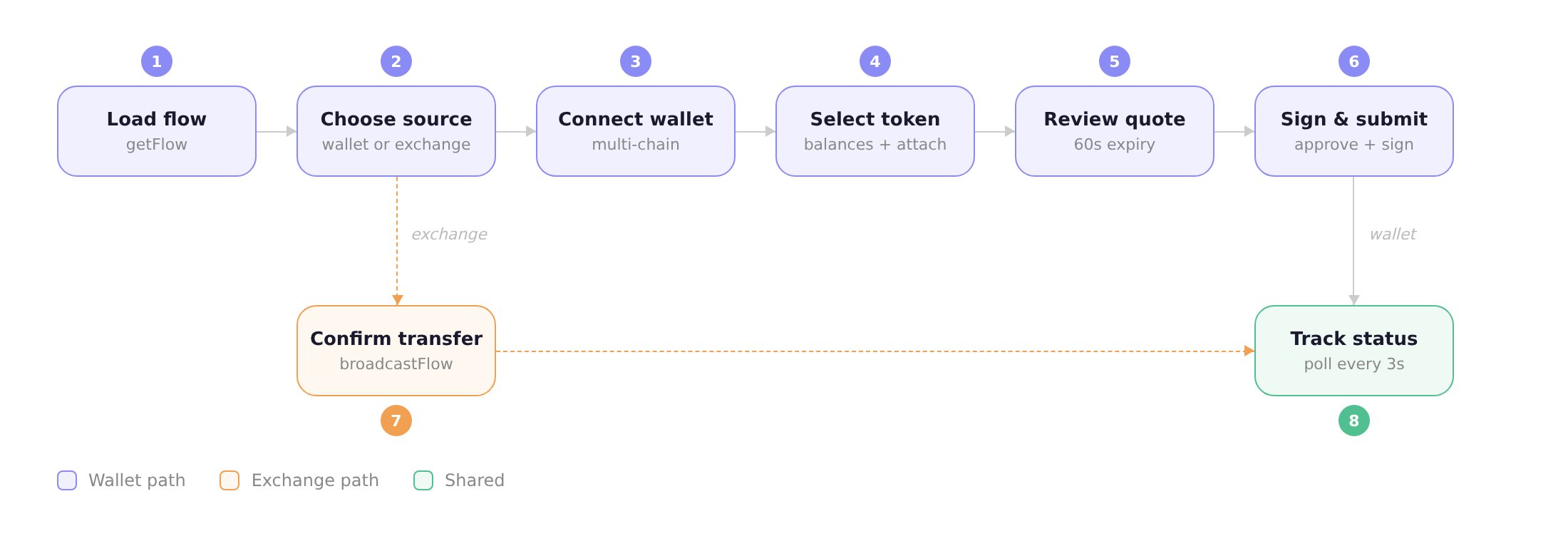
1. Load the flow
Your backend creates the flow and passes theflowId to the frontend. Always load the current state before choosing a screen. Do not replay attachFlowSource or another mutation just because the page reloaded:
2. Choose a payment source
Flow supports two source types: wallet (user signs from a Web3 wallet) and exchange (user pays via an exchange like Coinbase). Present both options and route to the matching path.Exchange path
For exchange sources, attach the source and open the exchange URL. After the user completes payment on the exchange, you callbroadcastFlow to notify the backend (see step 7).
3. Connect a wallet
With multiple chain extensions enabled, the SDK detects wallet providers on every chain. The same wallet (e.g. MetaMask) may appear multiple times: once per supported chain. Group providers bygroupKey so each wallet shows as one entry in your UI.
Wallet provider list
UseuseGetAvailableWalletProvidersData to list detected wallets, and connectWithWalletProvider to connect:
Chain picker
When a wallet supports multiple chains (e.g. MetaMask on EVM, or Phantom on both SOL and EVM), show a chain picker. Each entry in the group has achain property ("EVM", "SOL", "BTC", "SUI", "TRON") and a unique key:
WalletConnect support
If you added WalletConnect extensions in your setup, you can let users scan a QR code to connect mobile wallets. The SDK providesconnectWithWalletConnectEvm and connectWithWalletConnectSolana:
4. Select a network and token
Once a wallet is connected, show the wallet’s address, let the user pick a network (if applicable), and list their token balances. UseuseGetWalletAccounts to get the connected wallet account.
Network switching
EVM wallets can operate on multiple networks (Ethereum, Base, Arbitrum, etc.). UsegetNetworksData to list available networks for the wallet’s chain, and switchActiveNetwork to change:
Token list with auto-attach and auto-quote
UseuseGetTokenBalances to fetch the wallet’s tokens on the active network. When the user picks a token, attach the wallet as the flow source and fetch a quote in one step:
For Solana, pass
networkId: 101. For EVM, use the chain ID (e.g. 8453 for Base). Set includeNative: true to include ETH/SOL in the list.5. Review the quote
Display the quote so the user can review amounts, fees, and estimated time before signing. Quotes expire after 60 seconds: offer a refresh button:6. Sign and submit
submitFlowTransaction handles the full signing pipeline: prepare → approve token spend (if needed) → sign transaction → broadcast. Use the onStepChange callback to show a two-step progress indicator:
7. Confirm exchange transfer
For exchange sources, show a confirmation screen after the user completes payment on the exchange. CallbroadcastFlow to notify the backend:
8. Track status
After submission or exchange confirmation, pollgetFlow to track the flow through three milestones:
- Payment submitted: transaction broadcasted on-chain
- Source confirmed: on-chain confirmation received
- Settlement complete: funds delivered to the destination
Cancellation
Users can cancel at any point before broadcast withcancelFlow. After broadcast, the transaction is on-chain and cannot be reversed.
Error handling
See the error reference for all errors by step and how to resolve them. Key patterns:- Quote failures (
422): The response includes aquoteFailuresarray with per-token failure details ({ chainId, chainName, reason, symbol }). Show the reason to the user (e.g. “Amount is below the minimum for this token”). Note thatunknownoften means the amount is too low for conversion. Offer a different token or amount. - Wallet rejection: Detect
"reject"/"denied"in the error message. Offer retry or cancel. - Quote expiry: Navigate back to the quote view to refresh.
- State conflicts (
409): Re-fetch withgetFlowand resume from the current state. Pollbroadcastedorsource_confirmedflows instead of replaying mutations. Create a new flow aftercancelled,expired, orfailed.
Related
- Getting Started: Chain extensions, dashboard setup, API token
- JS SDK guide: Core SDK functions and full example
- Error reference: Errors by step with fixes
- API guide: Raw HTTP implementation