

Give the LLM access to docs
Provide your AI tool with Dynamic’s documentation so it can look up current APIs and code examples. Choose one or more of these methods:- Cursor MCP
- Add Dynamic's docs to Cursor
- llms.txt (any LLM tool)
- Copy a single page
Highly recommended over other approaches. Dynamic provides search over the docs via MCP for Cursor. Add it with the button below so Cursor can search the docs directly instead of relying on pasted context.
Follow this tutorial to add Dynamic’s docs to Cursor as custom docs. You can then reference them in requests with @docs.
Dynamic publishes llms.txt and llms-full.txt so you can use the docs as plain-text context in any LLM that supports it. See the llms.txt spec for details.
Every doc page has a “Copy page” button so you can copy the page as markdown or ask your LLM to use that page as context.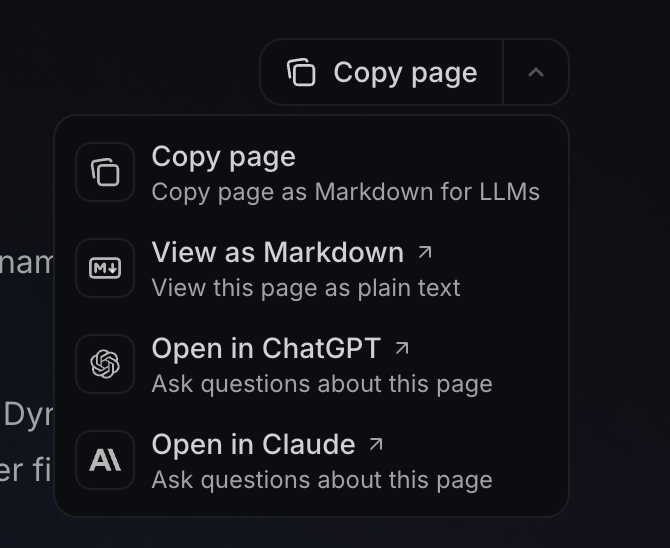
SDK skills
Each skill covers architecture, common misunderstandings, and patterns (no code or package names — the LLM looks those up in the docs). Copy the entire block including the frontmatter.Where to add the skill
Where to add the skill
Copy the full skill from the tab below, then:
- Cursor — Save as
.cursor/skills/dynamic-<sdk>/SKILL.md(e.g.dynamic-react). Folder name must match thenamein the file. - V0 — + → New Instruction, paste into the Rule field, apply when you chat.
- Other tools — Paste into that tool’s rules or system prompt.
- React
- React Native
- JavaScript
- Flutter
- Swift
- Kotlin
- Node
- Unity
Copy
Ask AI
---
name: dynamic-react
description: Integrate the Dynamic React SDK with correct provider setup, framework considerations, and common pitfalls. Use when building React, Next.js, or Vite apps with Dynamic auth or wallets, or when the user mentions Dynamic, DynamicContextProvider, wallet connection, or embedding Dynamic.
---

# Dynamic React SDK

You are helping build an app using the Dynamic React SDK.
**Docs:** https://dynamic.xyz/docs/react/ — use for all APIs and code; search there (MCP, llms.txt, or @docs) before writing implementation.
Before suggesting packages or code, search the SDK docs above for current setup and API names.

## Architecture

- Provider-based: The app must be wrapped in a context provider at the root. All Dynamic hooks and components must be descendants of this provider.
- Wallet connectors are modular: each blockchain family (EVM, Solana, etc.) has its own connector package that you import and pass to the provider's settings.
- Prefer custom UI for auth/wallet flows. Pre-built components (e.g. DynamicWidget) are available if the user wants them.

## Framework Considerations

- For Next.js (App Router): the provider uses client-side APIs, so it must live in a dedicated 'use client' Providers component. It cannot go directly in layout.tsx as a server component.
- For Next.js: webpack externals must be configured in next.config.js for certain Node-only modules that Dynamic's dependencies reference.
- For Vite: a process polyfill may be needed since Vite doesn't provide Node globals by default.
- Environment variable prefixes differ by framework (Vite uses VITE_, Next.js uses NEXT_PUBLIC_). Never use the old REACT_APP_ prefix.

## Common Misunderstandings

- When using Wagmi alongside Dynamic, the Dynamic provider must be the outermost wrapper. Putting Wagmi outside of it is a common mistake that causes subtle bugs.
- The EVM wallet connector covers ALL EVM chains and L2s -- you don't need separate connectors per EVM chain.
- CORS errors during development almost always mean the local dev URL hasn't been added to the allowlist in the Dynamic dashboard. Search the docs for "CORS" or "allowlist" to find where to add it.
Copy
Ask AI
---
name: dynamic-react-native
description: Integrate the Dynamic React Native SDK with client-based architecture, extensions, and platform considerations. Use when building React Native or Expo apps with Dynamic auth or wallets, or when the user mentions Dynamic, React Native SDK, wallet connection, or Expo with Dynamic.
---

# Dynamic React Native SDK

You are helping build a React Native app using the Dynamic React Native SDK.
**Docs:** https://dynamic.xyz/docs/react-native/ — use for all APIs and code; search there (MCP, llms.txt, or @docs) before writing implementation.
Before suggesting packages or code, search the SDK docs above for current setup and API names.

## Architecture

- Client-based, NOT provider-based. This is fundamentally different from the React SDK. You create a client instance and extend it with chain/feature extensions.
- Extensions are chained via an extend method -- each extension (React Native core, EVM, Solana, Sui, etc.) is added this way.
- A WebView component from the client must be rendered in the component tree. This is how Dynamic's UI is displayed.
- Do NOT use React SDK patterns (context providers, widget components) in React Native. They are different SDKs with different architectures.

## Platform Considerations

- Polyfill requirements vary by Expo SDK version. Newer Expo versions need fewer polyfills. Always check the docs for the user's Expo version.
- Social login and OAuth flows require deep link configuration: a URL scheme registered in app config and whitelisted in the Dynamic dashboard. Search the docs for "deep link" or "Whitelist Mobile Deeplink" to find the exact steps.
- Passkeys require additional native module setup beyond just installing a package.
- Some features require native builds (expo prebuild or EAS) and won't work in Expo Go.

## Common Misunderstandings

- This SDK does NOT use DynamicContextProvider or DynamicWidget. Those are React SDK concepts. React Native uses a client + extensions model.
- The SDK has specific peer dependencies for React Native (WebView, browser, linking, secure storage). Missing any of these causes runtime errors, not build errors.
- Some docs pages under the React Native section show React SDK code patterns (context providers) for certain chains -- those examples are not correct for the React Native client-based architecture.

## Patterns for Efficiency

- Start with the minimal client + React Native extension, confirm it works, then add chain extensions incrementally.
- Test on a real device early -- some features (global wallets, passkeys) don't work in simulators or Expo Go.
Copy
Ask AI
---
name: dynamic-javascript
description: Integrate the Dynamic JavaScript SDK (headless, framework-agnostic) with correct extension usage and chain setup. Use when building vanilla JS, Vue, Angular, or Svelte apps with Dynamic, or when the user mentions Dynamic, headless SDK, or wallet connection without React.
---

# Dynamic JavaScript SDK

You are helping integrate the Dynamic JavaScript SDK (headless/framework-agnostic).
**Docs:** https://dynamic.xyz/docs/javascript/ — use for all APIs and code; search there (MCP, llms.txt, or @docs) before writing implementation.
Before suggesting packages or code, search the SDK docs above for current setup and API names.

## Architecture

- Client-based, framework-agnostic. Works with vanilla JS, Vue, Angular, Svelte, or any other framework.
- You create a client with an environment ID, then add chain extensions by calling standalone functions (no arguments needed).
- Extensions are standalone function calls that register themselves -- they are NOT methods on the client object and do NOT take the client as a parameter.
- The client auto-initializes by default. Manual initialization is available if you need to control timing.

## Common Misunderstandings

- The extension function for Solana is named after "Solana," not "SVM." Using the wrong name is a common mistake from LLM training data.
- Extension functions take NO arguments. Passing the client to them is incorrect.
- This SDK supports many more chains than just EVM and Solana (Starknet, Sui, Tron, Bitcoin, Aptos, etc.). Don't assume it's limited.
- Chains must also be enabled in the Dynamic dashboard -- installing the extension alone isn't enough. Search the docs for "chains" or "dashboard" to find where to enable them.

## Patterns for Efficiency

- Listen for initialization status change events to know when the client is ready before making API calls. Search the docs for "init" or "initialization" to find the event names and usage.
- The SDK is headless -- it provides no UI.
Copy
Ask AI
---
name: dynamic-flutter
description: Integrate the Dynamic Flutter SDK with correct initialization, widget placement, and platform considerations. Use when building Flutter (iOS/Android) apps with Dynamic auth or wallets, or when the user mentions Dynamic, Flutter SDK, or wallet auth on mobile.
---

# Dynamic Flutter SDK

You are helping build a Flutter app using the Dynamic Flutter SDK.
**Docs:** https://dynamic.xyz/docs/flutter/ — use for all APIs and code; search there (MCP, llms.txt, or @docs) before writing implementation.
Before suggesting packages or code, search the SDK docs above for current setup and API names.

## Architecture

- SDK initialization must happen in main() BEFORE runApp(), after ensuring Flutter bindings are initialized.
- A Dynamic widget must always be present in the widget tree (typically in a Stack). This is how the SDK renders its UI overlay.
- SDK readiness is async -- you must listen to a readiness stream and wait for it before calling SDK methods.
- Features are accessed through module namespaces on the SDK instance: auth, wallets, UI, networks, etc.
- State is communicated via Dart Streams (tokenChanges, authenticatedUserChanges, userWalletsChanges, etc.).

## Platform Considerations

- iOS and Android only. No web or desktop support.
- Minimum versions: iOS 13.0+, Android 6.0+.
- Install packages with flutter pub add, not npm/yarn.
- Social auth on iOS & Android requires an additional web auth package and AndroidManifest configuration for the callback activity and deep link scheme.

## Common Misunderstandings

- Several client configuration properties that look optional are actually required (logo URL, app name). Check the docs for which are mandatory.
- The deep link URL must be whitelisted in the Dynamic dashboard under security settings. Search the docs for "deep link" or "Whitelist Mobile Deeplink" to find where. Forgetting this causes silent auth failures.
- Calling SDK methods before the readiness stream confirms readiness causes undefined behavior.
Copy
Ask AI
---
name: dynamic-swift
description: Integrate the Dynamic Swift SDK with correct SPM setup, initialization, and deep link handling. Use when building iOS apps with Dynamic auth or wallets, or when the user mentions Dynamic, Swift SDK, or wallet auth on iOS.
---

# Dynamic Swift SDK

You are helping build an iOS app using the Dynamic Swift SDK.
**Docs:** https://dynamic.xyz/docs/swift/ — use for all APIs and code; search there (MCP, llms.txt, or @docs) before writing implementation.
Before suggesting packages or code, search the SDK docs above for current setup and API names.

## Architecture

- Installed via Swift Package Manager. Search the Dynamic docs for "Swift" and "installation" to get the correct package URL and version.
- SDK is initialized in the @main App struct's init() method as a singleton.
- UI is triggered programmatically (e.g., show auth, show user profile) rather than by placing components in the view hierarchy.
- State observation uses Combine publishers (authenticatedUserChanges, userWalletsChanges, etc.).
- Deep link handling requires both an Info.plist URL scheme AND an onOpenURL handler on the root view.

## Common Misunderstandings

- Several client configuration properties are required that might look optional: redirect URL, app origin, logo URL, and app name are all mandatory.
- Forgetting the onOpenURL handler breaks OAuth and social login flows silently.
- Check the docs for the minimum SPM version -- using an older version tag causes build failures.
- Prerequisites: iOS 15.0+, Swift 5.9+, Xcode 14.0+.
Copy
Ask AI
---
name: dynamic-kotlin
description: Integrate the Dynamic Kotlin/Android SDK with AAR setup, async auth methods, and OAuth callback configuration. Use when building Android apps with Dynamic auth or wallets, or when the user mentions Dynamic, Kotlin SDK, or wallet auth on Android.
---

# Dynamic Kotlin/Android SDK

You are helping build an Android app using the Dynamic Kotlin SDK.
**Docs:** https://dynamic.xyz/docs/kotlin/ — use for all APIs and code; search there (MCP, llms.txt, or @docs) before writing implementation.
Before suggesting packages or code, search the SDK docs above for current setup and API names.

## Architecture

- SDK is distributed as AAR files, not via Maven/Gradle repositories.
- Initialization happens in MainActivity.onCreate() with required context and activity references.
- A composable UI element must be placed in the root Jetpack Compose layout.
- State observation uses Kotlin Flow (authenticatedUserChanges, userWalletsChanges, etc.).
- OAuth callbacks require a dedicated callback activity registered in AndroidManifest with a scheme matching your redirect URL.

## Common Misunderstandings

- Auth methods (sending OTP, verifying, etc.) are async/suspend functions. They must be called from a coroutine scope. Calling them directly from a composable or synchronous context will fail.
- Email OTP has rate limits (a few attempts per time window per email). The app should handle rate limit errors gracefully.
- AndroidManifest needs cleartext traffic enabled for development.
- Several client configuration properties that look optional are actually required. Check the docs.

## Platform Requirements

- Android SDK 28+, Kotlin 2.1.0+, Gradle 8.x+, Java 17.
Copy
Ask AI
---
name: dynamic-node
description: Integrate the Dynamic Node SDK for server-side wallet operations with correct API token usage and shared types package. Use when building backend or server-side wallet features with Dynamic, or when the user mentions Dynamic, Node SDK, server wallets, or programmatic wallet creation.
---

# Dynamic Node SDK

You are helping integrate the Dynamic Node SDK for server-side wallet operations.
**Docs:** https://dynamic.xyz/docs/node/ — use for all APIs and code; search there (MCP, llms.txt, or @docs) before writing implementation.
Before suggesting packages or code, search the SDK docs above for current setup and API names.

## Architecture

- Server-side only. No UI, no browser, no frontend components.
- Separate client classes for each chain family (EVM and SVM). You instantiate the one you need.
- Authentication uses a dashboard API token, NOT a user JWT. The token is created in the Dynamic dashboard (search the docs for "API token" or "server" to find where) and passed to the client after construction.
- Shared types (threshold schemes, wallet operations, etc.) come from a shared package that must be installed alongside the chain-specific package.
- Supports configurable threshold signature schemes for MPC wallet security.

## Common Misunderstandings

- The shared types package has a specific name that differs from what you might guess. Check the docs for the correct import path -- using the wrong package name is a very common mistake.
- The API token is NOT the same as a user's auth token. It's a server-level credential from the dashboard.
- Embedded wallets and relevant chains must be enabled in the dashboard before server-side wallet operations will work. Search the docs for "dashboard" and "embedded wallets" or "chains" to find where.
- Node.js 16+ is required.

## Patterns for Efficiency

- For faster EVM signing, search the docs for "MPC accelerator" or "EVM client" options on the server wallet client.
- Server wallets can be created programmatically and associated with users, enabling backend-driven wallet provisioning.
Copy
Ask AI
---
name: dynamic-unity
description: Integrate the Dynamic Unity SDK with scoped registry, CORS configuration, and platform considerations. Use when building Unity (Android/iOS) games or apps with Dynamic auth or wallets, or when the user mentions Dynamic, Unity SDK, or wallet auth in Unity.
---

# Dynamic Unity SDK

You are helping integrate the Dynamic Unity SDK.
**Docs:** https://dynamic.xyz/docs/unity/ — use for all APIs and code; search there (MCP, llms.txt, or @docs) before writing implementation.
Before suggesting packages or code, search the SDK docs above for current setup and API names.

## Architecture

- Installed via Unity Package Manager using a scoped registry (not the Asset Store).
- Environment ID is configured through a welcome window that appears after package installation.
- SDK communicates through a WebView layer. A specific CORS origin must be added in the Dynamic dashboard for both server URL and mobile server URL. Search the docs for "Unity" and "CORS" or "installation" to find the exact URL and steps.
- Supported platforms: Android, iOS, and Mac editor only. Mac editor behavior may differ from actual mobile.

## Common Misunderstandings

- CORS configuration is unique to Unity -- you must add the Unity WebView URL from the docs to the allowlist, not your own app URL. Search for "Unity CORS" or "installation" in the docs.
- For Android builds: secure session storage requires additional Gradle dependencies (data store and crypto libraries). Missing these causes a specific runtime error about missing crypto libraries -- check the docs for the exact Gradle config.
- Global Wallets must be tested on a real device. They do not work in the Unity Editor.
- Only EVM and SUI chains are currently supported.