

- Agent-friendly
- Step-by-step
Add the Dynamic docs MCP to your AI editor first — your agent can then query the docs directly. Instructions are on the Welcome page.
# Python SDK Quickstart

## Purpose and Usage

This document provides structured quickstart information for the Dynamic Python SDK. It is designed to be consumed by LLMs to generate accurate installation commands and code examples based on user requirements.

> **Important scope note:** The Dynamic Python SDK is for **server-side wallet operations only** — creating MPC wallets, signing messages, signing transactions, and key export/recovery. It does NOT handle frontend authentication or UI. If the user needs client-side auth, direct them to the React, JavaScript, or mobile SDK docs.

---

## How to use this document

Start by asking the user which path they want:

> "Would you like a **Quick start** (EVM + TWO_OF_TWO threshold scheme, zero configuration — recommended if you're just getting started) or a **Custom setup** (choose your chains and threshold scheme)?"

- If the user chooses **Quick start**: follow the Quick Start Path section exactly. Do not ask any configuration questions — execute the happy path as written.
- If the user chooses **Custom setup**: follow the Custom Setup Path section and ask all configuration questions before proceeding.

---

## Quick Start Path

> Use this path when the user chooses Quick start. Execute every step in order. Do not skip steps. Do not ask configuration questions.

**Stack:** Python + EVM only + TWO_OF_TWO threshold scheme

### Step 1 — Prerequisites

Tell the user:
- Python 3.11+ is required
- A Dynamic environment ID and API token are required — get them at https://app.dynamic.xyz/dashboard/developer/api

Ask the user for their environment ID and API token before proceeding.

### Step 2 — Install

```bash
pip install dynamic-wallet-sdk
```

Pre-built wheels are provided for Linux (x86_64, ARM64) and macOS (x86_64, Apple Silicon). No Rust toolchain required.

### Step 3 — Set up environment variables

Create a `.env` file or export directly:

```bash
export DYNAMIC_ENV_ID=your_environment_id_here
export DYNAMIC_API_TOKEN=your_api_token_here
export WALLET_PASSWORD=your_secure_wallet_password_here
```

> These names are a convention — the SDK does not auto-read environment variables. You pass values directly to the client constructor and `authenticate_api_token`.

### Step 4 — Initialize the client

```python
import asyncio
import os
from dynamic_wallet_sdk import DynamicEvmWalletClient

async def main():
    async with DynamicEvmWalletClient(os.environ["DYNAMIC_ENV_ID"]) as client:
        await client.authenticate_api_token(os.environ["DYNAMIC_API_TOKEN"])
        # client is now ready for wallet operations

asyncio.run(main())
```

> The SDK is fully async. Use `async with` for proper resource cleanup.

### Step 5 — Create a wallet

```python
from dynamic_wallet_sdk import DynamicEvmWalletClient, ThresholdSignatureScheme

async def main():
    async with DynamicEvmWalletClient(os.environ["DYNAMIC_ENV_ID"]) as client:
        await client.authenticate_api_token(os.environ["DYNAMIC_API_TOKEN"])

        wallet = await client.create_wallet_account(
            threshold_signature_scheme=ThresholdSignatureScheme.TWO_OF_TWO,
            password=os.environ["WALLET_PASSWORD"],
        )
        print(f"Wallet created: {wallet.account_address}")

asyncio.run(main())
```

> The `password` encrypts your key shares and backs them up to Dynamic. Keep this password — you need it to sign and recover shares.

### Step 6 — Sign a message

```python
signature = await client.sign_message(
    message="Hello from Dynamic!",
    address=wallet.account_address,
    password=os.environ["WALLET_PASSWORD"],
)
print(f"Signature: {signature}")
```

### Step 7 — Run the app

```bash
python main.py
```

---

## Custom Setup Path

> Use this path when the user chooses Custom setup. Ask ALL questions below before generating any code.

**Questions to ask the user:**
1. Which chains? (EVM only / Solana only / Both EVM and Solana)
2. Which threshold signature scheme? (TWO_OF_TWO recommended, or TWO_OF_THREE for higher availability)
3. Do you need key export or recovery capabilities?

### Chain-specific clients

**EVM:**
```python
from dynamic_wallet_sdk import DynamicEvmWalletClient
async with DynamicEvmWalletClient(env_id) as client:
    ...
```

**Solana (SVM):**
```python
from dynamic_wallet_sdk import DynamicSvmWalletClient
async with DynamicSvmWalletClient(env_id) as client:
    ...
```

### Threshold signature schemes

- **TWO_OF_TWO** (default, recommended) — requires your server and Dynamic's infrastructure to sign together. Most thoroughly tested.
- **TWO_OF_THREE** — requires two of three shares. Tolerates one party being offline.

### EVM transaction signing

```python
signature = await client.sign_transaction(
    address=wallet.account_address,
    tx={
        "to": "0xRecipientAddress",
        "value": 0,
        "nonce": 0,
        "gas": 21000,
        "gasPrice": 20_000_000_000,
        "chainId": 1,
        "data": "0x",
    },
    password=os.environ["WALLET_PASSWORD"],
)
```

### SVM wallet creation and signing

```python
from dynamic_wallet_sdk import DynamicSvmWalletClient, ThresholdSignatureScheme

async with DynamicSvmWalletClient(os.environ["DYNAMIC_ENV_ID"]) as client:
    await client.authenticate_api_token(os.environ["DYNAMIC_API_TOKEN"])

    wallet = await client.create_wallet_account(
        threshold_signature_scheme=ThresholdSignatureScheme.TWO_OF_TWO,
        password=os.environ["WALLET_PASSWORD"],
    )

    signature = await client.sign_message(
        message="Hello from Dynamic!",
        address=wallet.account_address,
        password=os.environ["WALLET_PASSWORD"],
    )
```

---

## Critical Reference

| Correct | Incorrect | Notes |
|---|---|---|
| `async with DynamicEvmWalletClient(env_id) as client` | `client = DynamicEvmWalletClient(env_id)` without context manager | Leaks resources without `async with` |
| `password=os.environ["WALLET_PASSWORD"]` | `password="hardcoded-value"` | Never hardcode passwords |
| `ThresholdSignatureScheme.TWO_OF_TWO` | `"TWO_OF_TWO"` as a string | Use the enum from the SDK |
| Import from `dynamic_wallet_sdk` | Import from `dynamic_labs` or similar | Only `dynamic_wallet_sdk` is the correct package |

---

## Troubleshooting — Dashboard Configuration

If the SDK initializes but wallet creation fails, verify:

### 1 — Embedded wallets not enabled
Go to **Wallets** in the Dynamic dashboard and enable embedded wallets.

### 2 — Chains not enabled
Go to **Chains & Networks** and enable Ethereum or Solana depending on which client you're using.

### 3 — API token permissions
Go to **Developer → API Tokens** and confirm the token has wallet operation scopes. See https://www.dynamic.xyz/docs/overview/developer-dashboard/api-token-permissions.

### 4 — Platform not supported
The SDK ships pre-built wheels for Linux (x86_64, ARM64) and macOS (x86_64, Apple Silicon). Windows is not yet supported — use WSL2.

If the issue persists, check https://docs.dynamic.xyz/overview/troubleshooting/general.

---

## Beyond This Quickstart

This prompt covers initial setup only. For deeper guides (EVM transactions, Solana operations, key export, delegated access, etc.), fetch the full documentation index:

**https://www.dynamic.xyz/docs/llms.txt**

This file contains every page in the Dynamic documentation organized by SDK. Search for the "Python SDK" section to discover all available pages and their URLs. Use it as your navigation source for any question beyond what this quickstart covers.

Alternatively, if the Dynamic MCP server is available in your environment, query it directly for any documentation page.
Prerequisites
- Python 3.11+
- Dynamic Account: Set up your project and get credentials from the Dynamic Developer Console
Install the SDK
pip install dynamic-wallet-sdk
x86_64, aarch64) and macOS (x86_64, Apple Silicon). No Rust toolchain required.Get Your Credentials
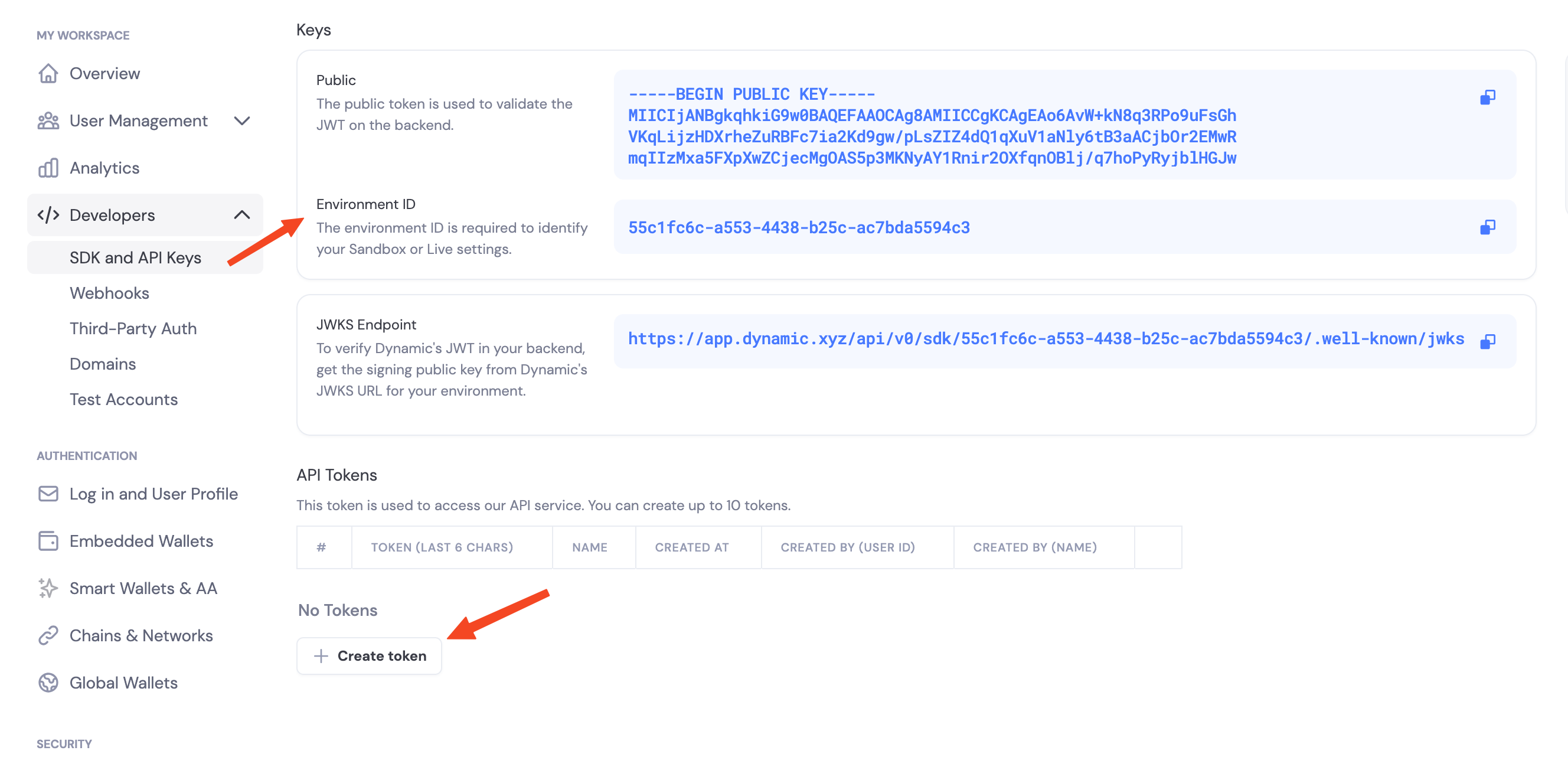
Navigate to the Dynamic Developer Console and:- Copy your
Environment ID - Create a new API token
Enable Features in Dashboard
Before you can use wallet features, you need to enable them in your Dynamic developer console:- Go to your Dynamic Developer Console
- Select your project
- Go to Wallets and enable embedded wallets
- Go to Chains and enable the networks you want to support (Ethereum, Solana, etc.)
Environment Variables
# .env
DYNAMIC_ENV_ID=your_environment_id_here
DYNAMIC_API_TOKEN=your_api_token_here
authenticate_api_token.Hello, Wallet
import asyncio
import os
from dynamic_wallet_sdk import DynamicEvmWalletClient

async def main():
    async with DynamicEvmWalletClient(os.environ["DYNAMIC_ENV_ID"]) as client:
        await client.authenticate_api_token(os.environ["DYNAMIC_API_TOKEN"])
        # ... wallet ops here

asyncio.run(main())
SDK Capabilities
- Embedded wallets: Create and use MPC wallets from your server
- Chains: Ethereum (EVM) and Solana (SVM)
- Async/await: Fully async Python API with
asyncio - Key backup: Password-encrypted key share backup and recovery
Threshold Signature Schemes
When you configure signing, you choose how key shares combine to authorize a signature:- TWO_OF_TWO: Default. Requires your server and Dynamic’s infrastructure to sign together. Most thoroughly tested.
- TWO_OF_THREE: Advanced. Requires two of three shares to sign. Tolerates one party being offline.
Next Steps
Ethereum (EVM)
- Create EVM Wallets
- Sign EVM Messages
- Sign EVM Transactions
- Sign Typed Data (EIP-712)
- Delegated Access