

The Rust SDK is in beta. The API surface is still settling — minor releases (0.0.x) may include breaking changes until we ship 1.0. Pin to an exact version in your
Cargo.toml (e.g. = "0.0.4") so a cargo update doesn’t move you onto a new shape. Not recommended for production traffic yet; great for prototypes, internal services, and design feedback.Found a rough edge? Email support@dynamic.xyz or open an issue on github.com/dynamic-labs/dynamic-waas-sdk.- Agent-friendly
- Step-by-step
Add the Dynamic docs MCP to your AI editor first — your agent can then query the docs directly. Instructions are on the Welcome page.
# Rust SDK Quickstart

## Purpose and Usage

This document provides structured quickstart information for the Dynamic Rust SDK. It is designed to be consumed by LLMs to generate accurate installation commands and code examples based on user requirements.

> **Important scope note:** The Dynamic Rust SDK is for **server-side wallet operations only** — creating MPC wallets, signing messages (EIP-191 on EVM, Ed25519 on SVM), exporting keys, and delegated access. It does NOT handle frontend authentication or UI. The SDK is **stateless** — you must persist wallet state yourself.

> **Beta notice:** The Rust SDK is v0.0.4. Pin exact versions (`= "0.0.4"`) in `Cargo.toml`. Imports, password rotation, refresh / reshare, BTC and TON are not yet available.

---

## How to use this document

Start by asking the user which path they want:

> "Would you like a **Quick start** (EVM + TWO_OF_TWO threshold scheme — recommended if you're just getting started) or a **Custom setup** (choose your chains and threshold scheme)?"

- If the user chooses **Quick start**: follow the Quick Start Path section exactly. Do not ask any configuration questions — execute the happy path as written.
- If the user chooses **Custom setup**: follow the Custom Setup Path section and ask all configuration questions before proceeding.

---

## Quick Start Path

> Use this path when the user chooses Quick start. Execute every step in order. Do not skip steps. Do not ask configuration questions.

**Stack:** Rust + EVM only + TWO_OF_TWO threshold scheme

### Step 1 — Prerequisites

Tell the user:
- Rust 1.90+ is required (install via https://rustup.rs/)
- A C toolchain is required (`cc` + linker). On Debian/Ubuntu: `sudo apt install build-essential`. macOS Xcode CLT is sufficient.
- A Dynamic environment ID and API token are required — get them at https://app.dynamic.xyz/dashboard/developer/api

Ask the user for their environment ID and API token before proceeding.

### Step 2 — Install

Add to `Cargo.toml`:

```toml
[dependencies]
dynamic-waas-sdk     = "=0.0.4"
dynamic-waas-sdk-evm = "=0.0.4"
tokio = { version = "1", features = ["full"] }
```

Or via CLI:

```bash
cargo add dynamic-waas-sdk@=0.0.4
cargo add dynamic-waas-sdk-evm@=0.0.4
cargo add tokio --features full
```

No extra registry config required — prebuilt MPC static libraries ship inside the crate.

### Step 3 — Set up environment variables

```bash
export DYNAMIC_ENV_ID=your_environment_id_here
export DYNAMIC_API_TOKEN=your_api_token_here
export WALLET_PASSWORD=your_secure_wallet_password_here
```

### Step 4 — Initialize the client

```rust
use dynamic_waas_sdk::{DynamicWalletClient, DynamicWalletClientOpts};
use dynamic_waas_sdk_evm::DynamicEvmWalletClient;

#[tokio::main]
async fn main() -> Result<(), Box<dyn std::error::Error>> {
    let env_id = std::env::var("DYNAMIC_ENV_ID")?;
    let api_token = std::env::var("DYNAMIC_API_TOKEN")?;

    let mut client = DynamicWalletClient::new(
        DynamicWalletClientOpts::new(env_id),
    )?;
    client.authenticate_api_token(&api_token).await?;

    let evm = DynamicEvmWalletClient::new(&client);
    // evm client is ready for wallet operations
    Ok(())
}
```

### Step 5 — Create a wallet

```rust
use dynamic_waas_sdk::ThresholdSignatureScheme;

let password = std::env::var("WALLET_PASSWORD")?;

let (wallet_props, key_shares) = evm.create_wallet_account(
    ThresholdSignatureScheme::TwoOfTwo,
    Some(password),
    true, // back_up_to_dynamic
).await?;

println!("Wallet created: {}", wallet_props.account_address);

// IMPORTANT: You must persist these yourself:
// - wallet_props → Redis / Postgres (non-sensitive)
// - key_shares → secrets vault / KMS (sensitive MPC key material)
```

> The SDK is **stateless**. `create_wallet_account()` returns `WalletProperties` + `Vec<ServerKeyShare>` that you must store and pass to every subsequent sign/export call.

### Step 6 — Sign a message

```rust
let signature = evm.sign_message(
    &wallet_props,
    &key_shares,
    "Hello from Dynamic!",
).await?;

println!("Signature: {}", signature);
```

### Step 7 — Run the app

```bash
cargo run
```

---

## Custom Setup Path

> Use this path when the user chooses Custom setup. Ask ALL questions below before generating any code.

**Questions to ask the user:**
1. Which chains? (EVM only / Solana only / Both EVM and Solana)
2. Which threshold signature scheme? (TWO_OF_TWO recommended, or TWO_OF_THREE for higher availability)
3. Do you need key export or recovery capabilities?
4. Do you need delegated access (per-wallet API keys)?

### Chain-specific setup

**EVM only:**
```toml
dynamic-waas-sdk     = "=0.0.4"
dynamic-waas-sdk-evm = "=0.0.4"
```

**Solana only:**
```toml
dynamic-waas-sdk     = "=0.0.4"
dynamic-waas-sdk-svm = "=0.0.4"
```

**Both:**
```toml
dynamic-waas-sdk     = "=0.0.4"
dynamic-waas-sdk-evm = "=0.0.4"
dynamic-waas-sdk-svm = "=0.0.4"
```

### Chain client initialization

```rust
use dynamic_waas_sdk_evm::DynamicEvmWalletClient;
use dynamic_waas_sdk_svm::DynamicSvmWalletClient;

let evm = DynamicEvmWalletClient::new(&client);
let svm = DynamicSvmWalletClient::new(&client);
```

### Backup modes

- `back_up_to_dynamic: true` (recommended) — SDK encrypts your share with `password` (AES-256-GCM) and uploads to Dynamic. Recover via `run_recover_key_shares` + same password.
- `back_up_to_dynamic: false` — no copy on Dynamic. Losing the share means losing the wallet.

> `password` is **required** when `back_up_to_dynamic: true`. The SDK rejects the call with `Error::InvalidArgument` if you pass `None`.

### Pointing at preprod or sandbox

```rust
let opts = DynamicWalletClientOpts::new(env_id)
    .base_api_url("https://app.dynamic-preprod.xyz");
```

---

## Critical Reference

| Correct | Incorrect | Notes |
|---|---|---|
| Pin exact version `= "0.0.4"` | Use `"^0.0.4"` or `"*"` | Breaking changes in 0.0.x releases |
| Persist `WalletProperties` + `Vec<ServerKeyShare>` after creation | Assume SDK stores state | SDK is stateless — you own persistence |
| Store key shares in a secrets vault (HSM/KMS) | Store in plaintext DB column | Sensitive MPC key material |
| `password=Some(password)` when `back_up_to_dynamic: true` | `password=None` with backup enabled | SDK rejects with `Error::InvalidArgument` |
| Import from `dynamic_waas_sdk_evm` for EVM ops | Import chain ops from `dynamic_waas_sdk` | Chain clients are in separate crates |

---

## Troubleshooting — Common Issues

### 1 — Linker errors during `cargo build`
Install a C toolchain. On Debian/Ubuntu: `sudo apt install build-essential`. On macOS: install Xcode Command Line Tools.

### 2 — Embedded wallets not enabled
Go to **Wallets** in the Dynamic dashboard and enable embedded wallets.

### 3 — Chains not enabled
Go to **Chains & Networks** and enable Ethereum or Solana depending on which client you're using.

### 4 — `Error::InvalidArgument` on `create_wallet_account`
You passed `password=None` with `back_up_to_dynamic: true`. Provide a password or set backup to `false`.

### 5 — Platform support
v0.0.4 ships native binaries for Linux (x86_64) and macOS (x86_64, ARM64). Windows is not supported — use WSL2.

If the issue persists, check https://docs.dynamic.xyz/overview/troubleshooting/general or the reference demo at https://github.com/dynamic-labs/dynamic-waas-rust-demo.

---

## Beyond This Quickstart

This prompt covers initial setup only. For deeper guides (EVM transactions, Solana operations, key export, delegated access, recovery, etc.), fetch the full documentation index:

**https://www.dynamic.xyz/docs/llms.txt**

This file contains every page in the Dynamic documentation organized by SDK. Search for the "Rust SDK" section to discover all available pages and their URLs. Use it as your navigation source for any question beyond what this quickstart covers.

Alternatively, if the Dynamic MCP server is available in your environment, query it directly for any documentation page.
Prerequisites
- Rust 1.90+ — install via rustup
- Dynamic Account — set up your project and get credentials from the Dynamic Developer Console
- C toolchain —
cc+ linker. On Debian/Ubuntu:sudo apt install build-essential. macOS Xcode CLT is sufficient.
Install
Add the crates you need to yourCargo.toml:[dependencies]
dynamic-waas-sdk = "=0.0.4"
dynamic-waas-sdk-evm = "=0.0.4" # EVM chains
dynamic-waas-sdk-svm = "=0.0.4" # Solana
tokio = { version = "1", features = ["full"] }
cargo add dynamic-waas-sdk@=0.0.4
cargo add dynamic-waas-sdk-evm@=0.0.4
cargo add dynamic-waas-sdk-svm@=0.0.4
cargo build resolves everything from crates.io.Get Your Credentials
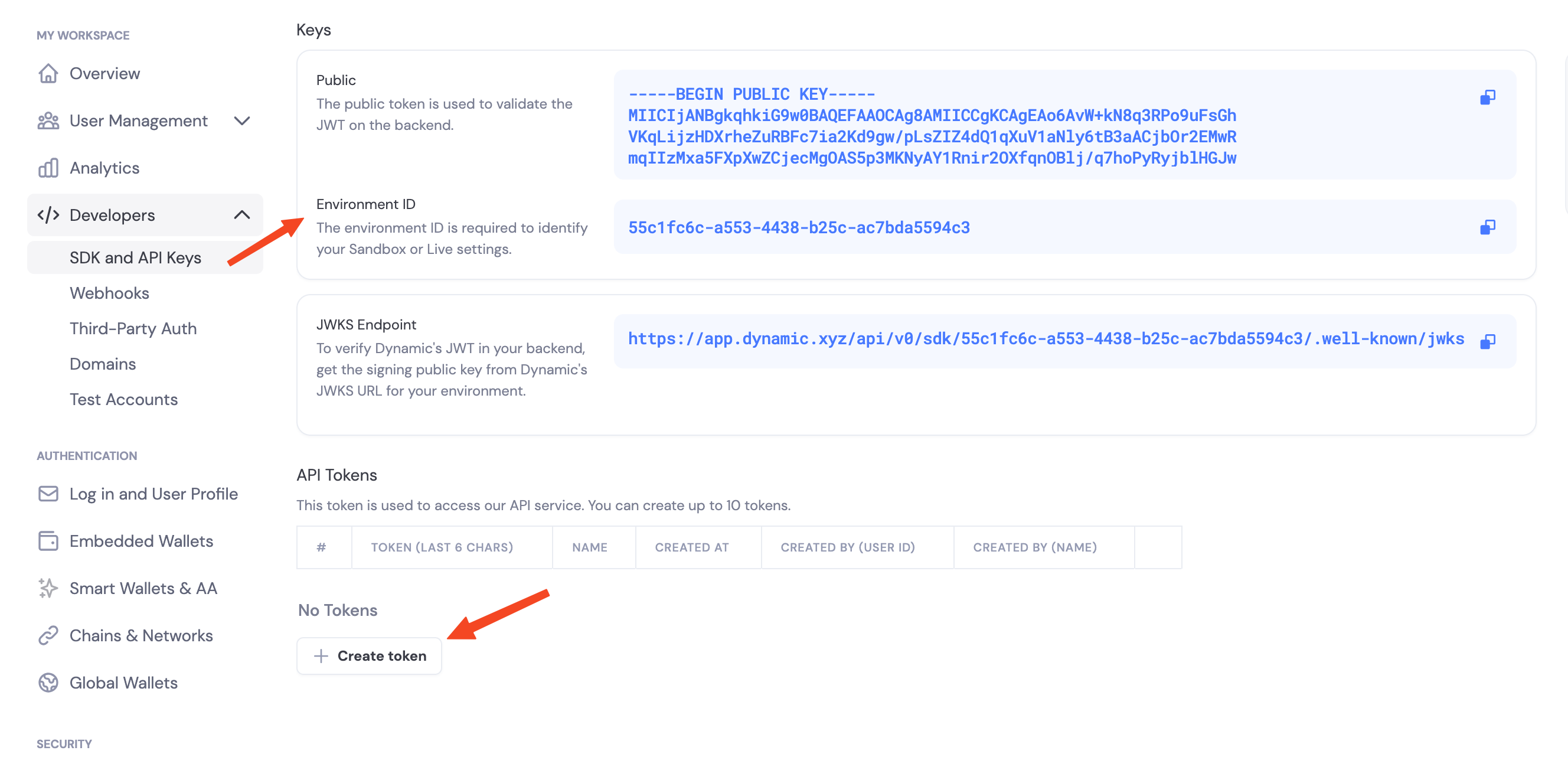
Navigate to the Dynamic Developer Console and:- Copy your
Environment ID - Create a new API token
Enable Features in Dashboard
Before you can use wallet features, enable them in your Dynamic developer console:- Go to your Dynamic Developer Console
- Select your project
- Go to Wallets and enable embedded wallets
- Go to Chains and enable the networks you want to support (Ethereum, Solana, etc.)
Environment Variables
# .env
export DYNAMIC_ENV_ID=your_environment_id_here
export DYNAMIC_API_TOKEN=your_api_token_here
Initialize the Client
use dynamic_waas_sdk::{DynamicWalletClient, DynamicWalletClientOpts};

let env_id = std::env::var("DYNAMIC_ENV_ID")?;
let api_token = std::env::var("DYNAMIC_API_TOKEN")?;

let mut client = DynamicWalletClient::new(
    DynamicWalletClientOpts::new(env_id),
)?;
client.authenticate_api_token(&api_token).await?;
DynamicWalletClient is the base server client. For chain-specific operations (create wallet, sign), wrap it in DynamicEvmWalletClient or DynamicSvmWalletClient — both are thin wrappers that borrow the base client:use dynamic_waas_sdk_evm::DynamicEvmWalletClient;
use dynamic_waas_sdk_svm::DynamicSvmWalletClient;
let evm = DynamicEvmWalletClient::new(&client);
let svm = DynamicSvmWalletClient::new(&client);
Stateless contract
The Rust SDK is stateless — it does not hold wallet state between calls.create_wallet_account() returns two pieces of state you must persist:WalletProperties— non-sensitive identity + backup-pointer info. Cache it in Redis / Postgres. Pass it to every subsequent sign / export operation.Vec<ServerKeyShare>— sensitive MPC key material. Store in a secrets vault (HSM, KMS-wrapped column, Secret Manager).
The Rust type is called
WalletProperties. It’s the same concept as the Node SDK’s WalletMetadata — same fields (wallet_id, account_address, chain_name, derivation_path, external_server_key_shares_backup_info).Key share backup: back_up_to_dynamic
Every create_wallet_account call accepts a back_up_to_dynamic: bool flag. You always vault the returned Vec<ServerKeyShare> yourself — the chain clients in 0.0.4 require it on every sign / export call. The flag only controls whether Dynamic also keeps an encrypted copy as a disaster-recovery backup.true(recommended) — the SDK encrypts your share withpassword(AES-256-GCM) and uploads the encrypted blob to Dynamic. If you ever lose your vaulted copy, recover it viarun_recover_key_shares+ the same password.false— no copy on Dynamic. Losing the share means losing the wallet.
password is required when back_up_to_dynamic: true — the SDK rejects the call with Error::InvalidArgument if you pass None. It never leaves your server; it’s used locally to wrap (and later unwrap) the share. When back_up_to_dynamic: false, password is optional.Threshold signature schemes
When you configure signing, you choose how key shares combine to authorize a signature:TWO_OF_TWO— Requires your server and Dynamic’s infrastructure to sign together.TWO_OF_THREE— Requires two of three shares to sign.
Pointing at preprod or sandbox
The SDK defaults to production. To target a different environment, passbase_api_url(...) on DynamicWalletClientOpts:let opts = DynamicWalletClientOpts::new(env_id)
.base_api_url("https://app.dynamic-preprod.xyz");
SDK capabilities (v0.0.4)
- Embedded wallets: Create and use wallets from your server (EVM, SVM).
- Message signing: EIP-191 messages on EVM, raw-bytes Ed25519 messages on SVM.
- Typed data: EIP-712 typed data signing on EVM.
- Transactions: Sign EVM transactions and Solana transaction message bytes.
- Key export: Export raw private keys for migration / disaster recovery.
- Delegated access: Per-wallet API key flow mirroring
@dynamic-labs-wallet/node, including the webhook decrypt helper.
Reference Demo
A runnable end-to-end demo lives atdynamic-labs/dynamic-waas-rust-demo — full lifecycle (auth → create → sign → recover → export) for both EVM and SVM, consuming the published crates. Good shape reference for what a customer integration looks like.Next Steps
EVM Support
- Create EVM Wallets — Create Ethereum wallets
- Sign EVM Messages — Sign Ethereum messages (EIP-191)
- Export EVM Private Key
- Delegated Access — Per-wallet API key signing