Overview
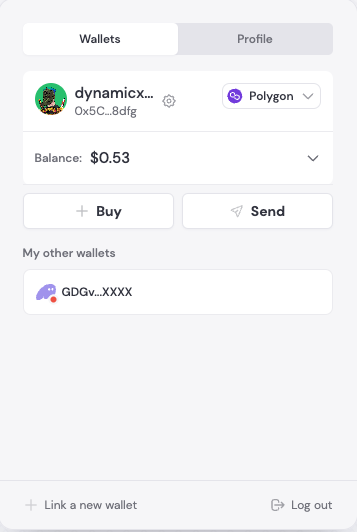
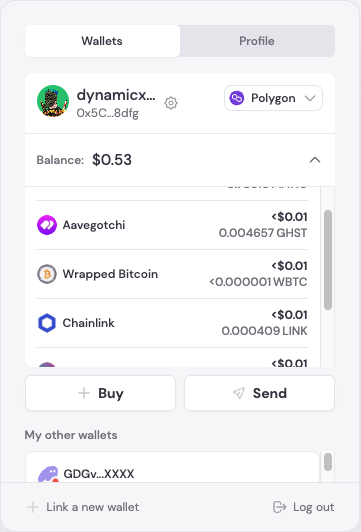
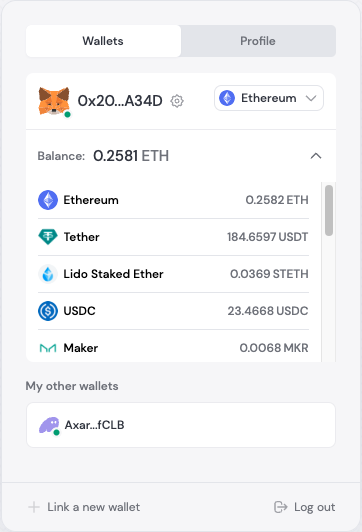
With Dynamic’s multi-asset UI, you can present your end users with the individual balances of each asset they hold in their wallet.
Balance and pricing information is refreshed every 20 min. If you need minute by minute refresh and different asset support, contact sales.
The list of tokens reflect the top 1000 tokens by DEX volume. We leverage Coingecko for pricing.
You can also choose to show the Fiat balance of those assets in whatever their primary currency is.
Multi-asset is only supported on the following networks: Ethereum, Optimism, Polygon, Arbitrum, and Base.
Configuration
Enabling multi-asset (turned on by default) is as simple as a toggle in the Dynamic Dashboard within the Log in & User Profile page, under the “Design Settings” section.
UI Layout
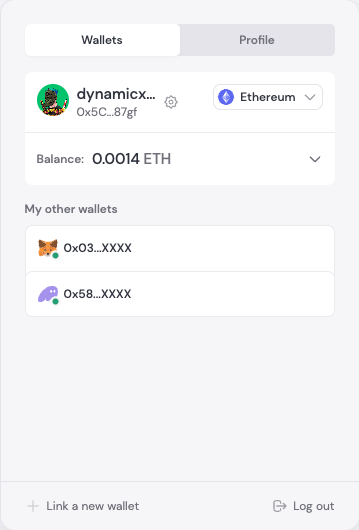
The multi-asset UI is designed to be collapsible, so that it doesn’t take up too much space on your page. It will display balances in either the native token or the fiat equivalent, depending on your configuration.
It will display in the user profile section of the DynamicWidget, or if you are implementing individual UI components, you can use the UserProfile component.
React Native and Flutter
React
React Native
Swift
Flutter
The Multi-asset UI is available in the DynamicWidget and UserProfile components.// Multi-asset UI is available in the DynamicWidget and UserProfile components
import { DynamicWidget, DynamicUserProfile } from "@dynamic-labs/sdk-react-core";
const App = () => {
return (
<div>
<DynamicWidget />
{/* or */}
<DynamicUserProfile />
</div>
);
};
The Multi-asset UI is part of the User Profile in React Native. Open the profile to let users view their token balances.// The Multi-asset UI is part of the User Profile. Open the profile to let users view their token balances.
import { dynamicClient } from '<path to client file>'
const OpenProfileForBalances = () => {
return (
<Button
title="View Balances"
onPress={() => dynamicClient.ui.userProfile.show()}
/>
)
}
The Multi-asset UI is part of the User Profile in Swift. Open the profile to let users view their token balances.// The Multi-asset UI is part of the User Profile. Open the profile to let users view their token balances.
// The UI is handled through the Dynamic widget integration
The Multi-asset UI is part of the User Profile in Flutter. Open the profile to let users view their token balances.// The Multi-asset UI is part of the User Profile. Open the profile to let users view their token balances.
import 'package:dynamic_sdk/dynamic_sdk.dart';
import 'package:flutter/material.dart';
class OpenProfileForBalancesButton extends StatelessWidget {
const OpenProfileForBalancesButton({super.key});
@override
Widget build(BuildContext context) {
return ElevatedButton(
onPressed: () => DynamicSDK.instance.ui.showUserProfile(),
child: const Text('View Balances'),
);
}
}
Build it yourself
React
React Native
Swift
Flutter
You can also build your own multi-asset UI using the hooks provided by the Dynamic SDK, you can use the useTokenBalances hook to do so. React Native doesn’t have a hook equivalent for multi-asset functionality. Use the SDK UI via the User Profile to access multi-asset functionality.
Swift doesn’t have a hook equivalent for multi-asset functionality. Use the SDK UI via the User Profile to access multi-asset functionality.
Flutter doesn’t have a hook equivalent for multi-asset functionality. Use the SDK UI via the User Profile to access multi-asset functionality.
Multi-asset UI is currently specific to the React SDK. For React Native, Swift, and Flutter, use the SDK UI via the User Profile to access multi-asset functionality.